

Is Yolla good value for international calls? US$3 credit, rates and catches explained
Yolla uses the internet to call overseas mobiles and landlines. Check its per-minute rates, how to get US$3 in referral credit, and the limits on top-ups and refunds before deciding whether it suits you.
Last updated 14 October 2026
Yolla
A7T8I9Ad / referral links — we may earn a bonus when you sign up.
Full details & steps →Best for
People who often need to call conventional overseas phone numbers and are willing to check the rates for each destination.
Yolla is an app for calling overseas numbers over Wi-Fi or mobile data. It is not a local SIM plan with a monthly fee. Your destination and whether you call a mobile or landline affect the price, so enter the number and check the per-minute rate before deciding how much to top up. With this page's invitation code A7T8I9, Yolla says you can get US$3 in call credit after your first payment; its FAQ says a top-up of US$4 or more is required for the referral to count. This is app credit, not cash. Do not top up more than you can use just to get US$3.
Pros
- Can call overseas mobiles and landlines
- Listed in the Hong Kong App Store
- US$3 credit can cover call charges
- No need to replace your local SIM to make calls
- The other person doesn't need the app; you call their normal number
Watch-outs
- Rates vary by destination and number type
- Requires a top-up, and the reward is not cash
- Switching between Wi-Fi and mobile data during signup can stop the referral from being recorded
- Check the current terms for refunds after topping up and balance expiry
- Calling on mobile data eats into your own data allowance
Current related offer
Yolla offer pageAd / referral links — we may earn a bonus when you sign up.
Provider
Yolla
Get started with Yolla through the invite link on this page and code A7T8I9. The app lets you make low-cost calls to mobiles and landlines worldwide using Wi-Fi or mobile data. You'll need to make a paid top-up first: Yolla's official Free Credits page says invited new users get US$3 added to their balance after their first payment, and its FAQ says only top-ups of US$4 or more count for referrals. If A7T8I9 doesn't appear on the payment screen, enter it in the menu's Get bonus / Bonus (promotions) section before topping up. Check the call rate, payment currency and total in the app so you know what you'll pay.
Requirement: Your first paid Yolla top-up; its FAQ says only top-ups of US$4 or more count for referrals
EasyAbout 5 minutes to install the app and make your first top-upPayout The US$3 call credit goes into your Yolla balance as soon as your first qualifying payment goes through, subject to Yolla's referral terms
Verified 14 October 2026
Full claim instructions are on the Yolla offer page.
1. What is Yolla?
Yolla uses an internet connection to call overseas mobile and landline numbers, working over Wi-Fi or mobile data. It is not a local monthly phone plan and does not replace your existing SIM; calls made over mobile data use your existing data allowance.
If you and the person you are calling both use the same free messaging app, first consider whether calling directly through that app would be more convenient.
How are call rates calculated?
Per-minute rates vary by country and whether the number is a mobile or landline. There is no single low rate that applies worldwide. Before topping up, enter the full phone number in the app and check the rate, minimum charges and connection rules.
For payments in Hong Kong, the displayed currency, App Store in-app purchase prices and website top-up prices may differ. Check the actual amount before paying, rather than looking only at the price in US dollars.
3. US$3 is call credit, not cash
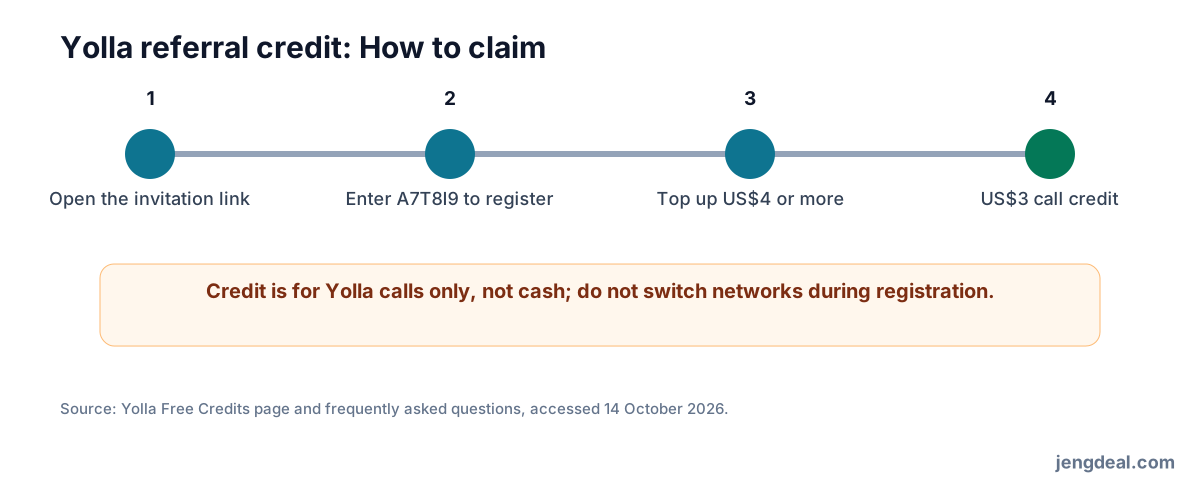
Open this page's invitation link and sign up with A7T8I9. Yolla's official Free Credits page says new users can receive US$3 in call credit after their first payment. Yolla's FAQ says a top-up of US$4 or more is required for the referral to count.
Open the invitation link on your phone and sign up immediately after installing the app. Avoid switching from Wi-Fi to mobile data and back during the process. If the code is not shown when you pay, enter it under Get bonus/Bonus in the app before topping up. The credit can only be used for calls; it cannot be withdrawn or transferred to someone else.
4. Complete signup in one go
Open the invitation link on your phone and sign up immediately after installing the app. Do not switch devices or clear the process. Yolla warns that switching between Wi-Fi and mobile data during signup can cause referral tracking to fail.
After signing up, check that the promo code has been recorded before paying. If it has not, keep a record of the invitation, signup and payment times, then contact official customer support; Yolla decides whether to credit the reward afterwards.
5. The balance has limits on how it can be used
The US$3 is only a call balance within Yolla, not a deposit, cash or an asset you can transfer out. Read the cancellation and refund rules before topping up, and do not add a large amount you may not use up just to claim the credit.
In-app purchases may be processed by Apple or Google, so refunds must follow the platform's process. The payment screen shows the actual amount charged.
6. Try calling your usual destinations first
Yolla is listed in the Hong Kong App Store, but store ratings do not mean calls to the country you need will always connect well. Try your usual numbers with a small amount of credit, check that calls connect and sound clear, then decide whether to use it long term.
If a call is unclear, check your network first, then contact customer support. Do not assume calls to every destination are stable.
7. Who is it suited to?
If you often need to call conventional overseas mobile or landline numbers and are willing to check the rates before each call, you could give it a try. Treat the US$3 credit as a one-time trial. Whether it offers good value over the long term depends on how much you call and where you call.
If you and your family or friends can use free messaging apps, you only want to buy a local SIM, or you do not want to top up first, you may not need Yolla.
FAQ
- What is Yolla's promo code?
- A7T8I9. Open this page's invitation link on your phone, then install the app and sign up. If the code is not applied automatically, enter it in the app.
- Can I get the US$3 as cash?
- No. It is Yolla call credit and cannot be withdrawn or transferred.
- How much do I need to top up for the referral to count?
- Yolla's FAQ says a top-up of US$4 or more is required. Check the current terms in the app again before paying.
- Can I call mobiles and landlines?
- Yolla's official information says you can call overseas mobiles and landlines. Check the available countries and actual rates in the app.
- Why was my referral code not tracked?
- Yolla advises signing up promptly after installing the app through the invitation link on your phone, and avoiding switching between Wi-Fi and mobile data during signup.
- Can I use Yolla in Hong Kong?
- Yolla is listed in the Hong Kong App Store and supports overseas calls. Data charges, payment currency and call prices depend on your network and what the app displays.