

box by Simular Review (JengDeal): Are Code GX5Z28DA's 5,000 Extra Credits Worth a Spin?
How box by Simular hands Claude, ChatGPT, Codex and Cursor a cloud Ubuntu machine over remote MCP, what 10,000 starting credits actually run, and the 14-day idle wipe to watch out for.
Last updated 17 November 2026

box by Simular
GX5Z28DAAd / referral links — we may earn a bonus when you sign up.
Full details & steps →Best for
Hong Kong makers, analysts and AI tinkerers who want Claude, ChatGPT, Codex or Cursor clicking through browser workflows on an isolated cloud machine instead of risking their daily laptop.
Bottom line: if you already lean on Claude, ChatGPT, Codex or Cursor, box by Simular saves you spinning up a bare VPS and babysitting Chrome drivers — and it asks for zero card details upfront. Joining via our link and locking in code GX5Z28DA before starting your first personal box doubles the Free tier's 5,000 signup credits to 10,000 credits (US$10 value, roughly 100 Free-box hours, valid 90 days). Just keep two hard clocks and one big Google caveat in mind: credits expire after 90 days, Free and Plan S boxes (US$19/month) vanish permanently after 14 idle days asleep, and Google blocks Gemini web custom apps outside the US — so stick to Claude, ChatGPT, Codex, Cursor or Gemini CLI in Hong Kong.
Pros
- 10,000 starting credits (~100 Free-box hours over 90 days) with no credit card required upfront
- One hosted remote MCP link covers chat apps and coding agents via quick browser OAuth
- Browser Live View lets you jump in cleanly with Take Control for 2FA codes, logins and captchas
- Secrets vault swaps real API keys solely to up to 8 allowlisted hosts while box shells only see a cbv_ dummy string
- Idle Free and Plan S boxes sleep automatically and wake in roughly one second so overnight pauses waste zero runtime credits
Watch-outs
- 14 consecutive days asleep wipes Free and Plan S (US$19/month) boxes permanently — saved scripts and cookies included
- Credits carry no cash-out value, expire in 90 days, and your host Claude/ChatGPT plan still charges as usual
- Google excludes Hong Kong from Gemini web custom apps, and Claude Free allows only a single custom connector
- Public docs list no standalone referral T&Cs or refund policy, and Plan S/M renewals bill in USD with FX fees on typical HK cards
- Agent-created boxes (box_create) never receive Secrets, and scripts need bash -lc plus an updated box image
Current related offer
box by Simular offer pageAd / referral links — we may earn a bonus when you sign up.
Provider
box by Simular
Want Claude, ChatGPT, Codex or Cursor clicking around in Chrome and running scripts without touching your daily machine? box by Simular hands your AI its own cloud Ubuntu desktop over one remote MCP link. Open our link to lock in code GX5Z28DA before starting your first personal box and pocket 5,000 extra credits (worth US$5) on top of the Free tier's 5,000 signup credits — 10,000 starting credits (~100 Free-box hours, valid 90 days) without handing over a card.
Requirement: Zero spend and zero card details needed — just apply GX5Z28DA before launching your first box
EasyAbout 5 minutes to set up your personal account and connect your AIPayout 5,000 bonus credits drop immediately when your first box boots (90-day expiry)
Verified 17 November 2026
Full claim instructions are on the box by Simular offer page.
What box by Simular actually gives your AI
Simular packages box by Simular overview as one ready-to-drive Ubuntu Linux desktop running Chrome and a persistent shell, connected straight into your AI client over MCP. Instead of babysitting local Playwright scripts on your own laptop, you register one hosted server endpoint and let your model handle multi-step browsing, terminal work and GUI checks remotely, laid out end-to-end across the full documentation.
Keeping that browser off your everyday notebook pays off immediately. Any sketchy page your AI opens stays quarantined inside an isolated cloud container well away from logged-in Hong Kong e-banking tabs or work Slack sessions, and you can close your MacBook mid-run without killing background browser jobs.
Connecting Claude, ChatGPT, Codex, Cursor and Gemini CLI cleanly
Every supported client dials https://mcp.box.simular.ai/mcp using Streamable HTTP and browser OAuth 2.0, covered step-by-step in the MCP server guide and install guide. Terminal users with Node.js 18.17+ simply run npx @simular-ai/[email protected] connect to configure Claude Code, Codex, Cursor, OpenCode, Hermes, OpenClaw and VS Code cleanly. If you tried box before 4 November 2026 on legacy relay.simular.cloud/mcp, re-run connect immediately — old auth routes stall.
Watch the client traps before wiring up everything in Hong Kong. Claude offers one-tap links across web, desktop and mobile, though Free plans allow just one custom connector and Team/Enterprise workspaces need an Owner first. ChatGPT plugins must be created on desktop at chatgpt.com/plugins before syncing to iOS/Android, and certain team workspaces switch custom MCP off. Meanwhile Google's Gemini custom apps rules wall off web custom apps exclusively to 18+ English personal accounts inside the United States with Keep Activity on — so Hong Kong users should use Gemini CLI instead, or stick with Claude, ChatGPT, Codex (mention @box so it skips Box.com) or Cursor.
Doing the credit maths: 10,000 starting credits vs Plan S and Plan M
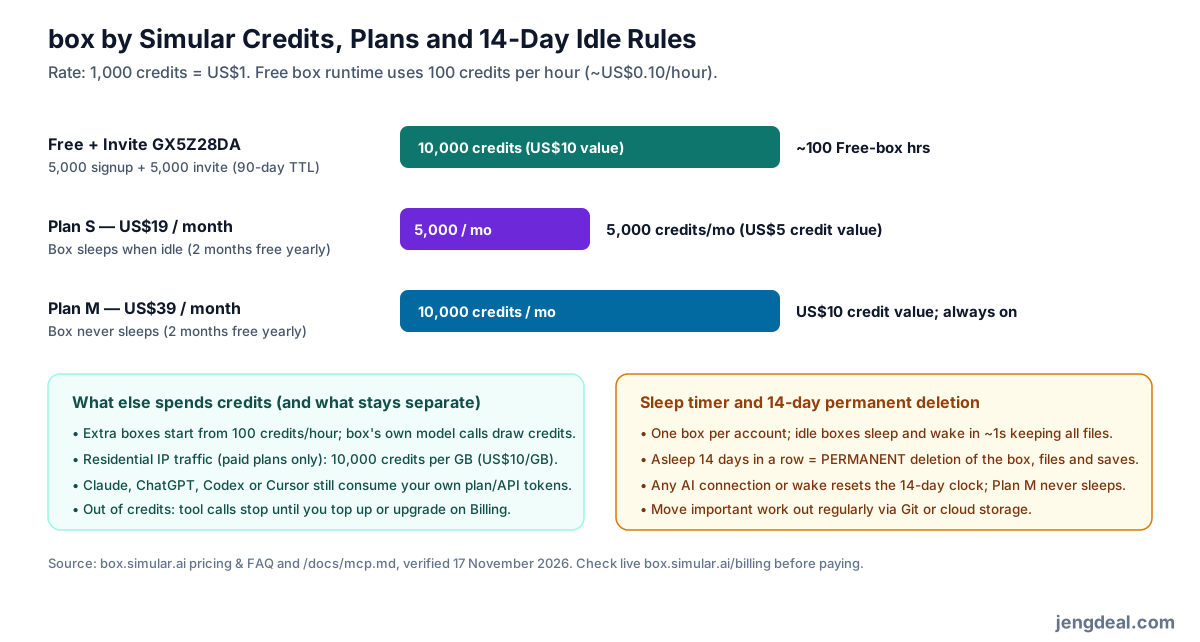
Everything is priced around 1,000 credits = US$1 on the box pricing page, with upgrades and top-ups handled at Billing. A Free box ticks down at 100 credits/hour (US$0.10/hour), and new signups receive 5,000 credits valid for 90 days. Apply invite code GX5Z28DA before starting your first box and Simular stacks another 5,000 credits (also 90-day expiry) — putting 10,000 starting credits (US$10 compute value, roughly 100 Free-box hours) in your tank without dropping a card number.
Should you outgrow the free runway, paid plans split clearly on uptime rather than raw hour bargains. Plan S runs US$19/month for 5,000 monthly credits (still sleeps idle), while Plan M runs US$39/month for 10,000 monthly credits and never sleeps — annual billing cuts two months free on both. Factor in three fast drains too: extra boxes start from 100 credits/hour, box's own model calls eat credits, and paid-only residential IP data costs a hefty 10,000 credits/GB (US$10/GB). Also remember your host Claude or OpenAI subscription still bills separately, and standard Hong Kong credit cards will tack on FX fees on USD plans.
Live view, Take Control and everyday client quirks
Most browser automation falls over on login screens, SMS 2FA or captchas. Simular solves that cleanly with Live View: open the stream, click Take Control yourself to punch in credentials or solve the challenge, then pass the reins straight back to your AI. In our own daily engineering routine, our coding agents (Claude Code and Codex) use box as a shared cloud workstation for GUI and browser tasks while we drop into live view whenever logins or captchas pop up.
Real-world quirks still matter, and the troubleshooting guide flags them plainly. Claude desktop streams live inside Chat and Code yet downgrades to screenshots and links inside Cowork; Claude Code also captures a static frame right after loading Live View. ChatGPT and Codex apps require a one-off sign-in inside ChatGPT's built-in browser for Take Control plus tapping Refresh after box updates, while Windows Codex app users must paste the URL into Settings manually because Windows sandboxing blocks config.toml edits. Above all, Free and S boxes wake in ~1 second from idle — yet 14 consecutive sleep days erase the whole box forever.
Secrets proxy protection and where it stops short
Dumping API keys directly into AI prompts risks leaving live credentials in chat logs or leaking them to malicious web text. Storing keys inside Simular's Secrets dashboard keeps the real value encrypted and gives box shells a harmless cbv_ placeholder instead; outbound traffic to up to 8 allowlisted hosts (including *.example.com wildcards) gets the authentic token swapped in by Simular's proxy on exit.
Respect the four boundaries documented in the secrets documentation so secrets never fail silently. Only box's shell tool or newly launched terminal tabs inherit the placeholder — script_run callers must wrap work in bash -lc. Each secret supports only one format (header vs query string requires two entries), boxes spawned via box_create never receive Secrets, and older box OS images must be updated in box Settings before proxy swapping activates.
Running headless loops, CI jobs and static keys
Once interactive OAuth sign-in succeeds on a workstation, unattended scheduled jobs follow patterns in the headless guide. In Claude Code, keep your task prompt right after -p ahead of --allowedTools mcp__box (or mcp__claude_ai_box when connected through claude.ai) so the parser doesn't swallow the prompt. In Codex CLI, put default_tools_approval_mode = "approve" strictly under [mcp_servers.box] with box_delete kept on "prompt" rather than turning off local host sandboxing globally.
Headless CI runners or non-OAuth apps such as DeepSeek Harness (dsh) authenticate using a one-time cb_ Bearer token from Access settings passed via BOX_TOKEN. Store it exclusively inside your CI secret vault — never check plaintext tokens into Git repositories — and revoke stale keys promptly.
Claiming GX5Z28DA properly before your first boot
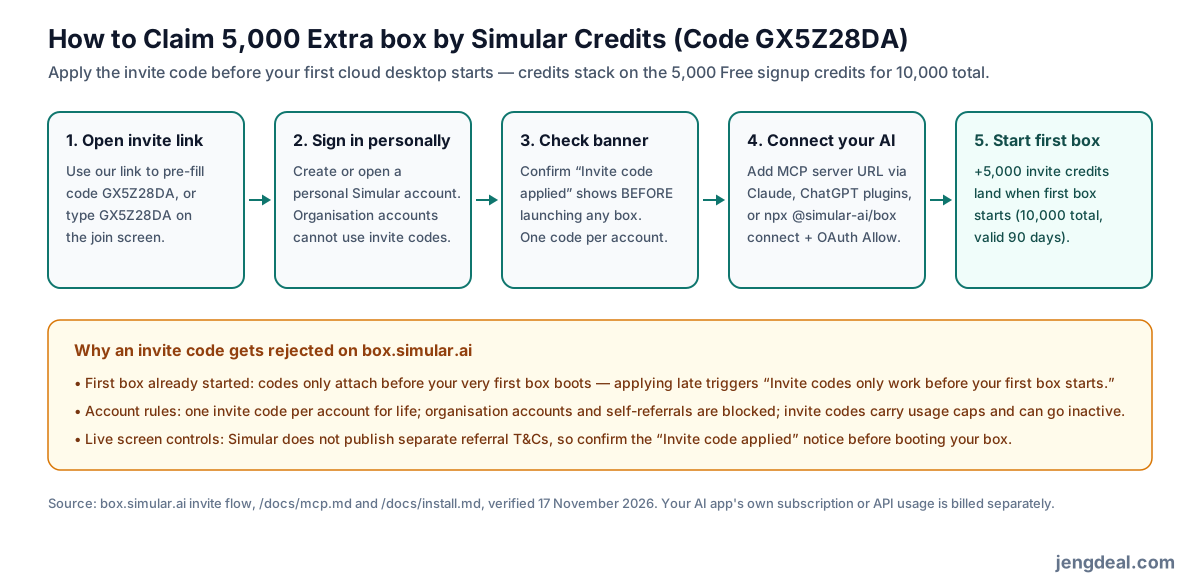
Click our Simular box invite link so code GX5Z28DA pre-fills automatically (or type GX5Z28DA on join), create or sign into a personal Simular account, and check that the confirmation notice clearly displays +5,000 credits when starting your first box BEFORE launching anything. Connect MCP to a supported AI app, authorise OAuth and trigger your first run — booting that initial box credits 5,000 invite credits straight alongside your 5,000 signup credits for 10,000 total (valid 90 days).
Code bounces happen fast if rules are broken: booting even one Free box beforehand blocks invite codes permanently, organisation accounts are excluded, accounts get one invite code for life, self-referrals fail, and codes have usage caps. Since Simular publishes no standalone referral T&Cs or refund page, treat the live join screen and Billing checkout as final.
Who gets value here and how to wrap up cleanly
If you already pay for Claude, ChatGPT or coding tools and want roughly 100 risk-isolated Free-box hours with zero card commitment, GX5Z28DA is easy value. Skip it if you want withdrawable HKD cash, expect files to sit untouched past 14 sleep days without buying Plan M (US$39/month), or hoped to drive box through Hong Kong Gemini web custom apps.
Shutting down cleanly takes four quick steps: pull scripts, downloads and cookies out via Git or cloud storage before the 14-day sleep wipe triggers, wipe tokens from Secrets, revoke connected OAuth apps and cb_ tokens in Access settings, and cancel any S or M subscription inside Billing (email [email protected] if anything looks off).
FAQ
- What does invite code GX5Z28DA actually hand me?
- Applying GX5Z28DA on a personal account before your first box starts drops 5,000 extra credits (worth US$5) onto the Free tier's 5,000 signup credits — 10,000 starting credits valid 90 days, card-free.
- Can Hong Kong users sign up without a US card or VPN?
- Yes. Simular publishes no country exclusion list for box and Free signups take no card details. Only Google's Gemini web custom-app slot stays US-only; Claude, ChatGPT Plugins, Codex, Cursor and Gemini CLI all run from Hong Kong.
- Too late — I booted a box first. Can I still add GX5Z28DA?
- No. Simular locks invite codes once an account's first box has booted. Organisation accounts and repeat codes are also blocked.
- Do 10,000 credits really mean ~100 hours?
- Yes for standard single Free-box usage: at 1,000 credits = US$1 and 100 credits/hour, 10,000 credits stretch to roughly 100 active hours inside 90 days while sleep pauses consumption. Extra boxes (100+ credits/hour), box model calls and paid-only residential IPs (10,000 credits/GB) spend faster.
- What happens if I leave scripts on box during a two-week holiday?
- Any Free or Plan S box left continuously asleep for 14 days in a row gets permanently deleted alongside every saved file. Wake it before day 14 or push your files off-box — only Plan M (US$39/month) never sleeps.
- Are Secrets completely leak-proof if I run Python scripts?
- Secrets protect keys behind a cbv_ placeholder and swap only on requests to up to 8 allowlisted hosts, yet only shell commands receive them by default — Python/JS via script_run must call through bash -lc, and box_create desktops receive zero Secrets.
- Will Simular auto-charge me when credits run empty, or refund Plan S/M?
- No card is held on Free, so empty credits simply halt tool calls until you visit box.simular.ai/billing. No public refund policy is published on box.simular.ai, so review live USD checkout screens carefully before upgrading.