

RoxyBrowser with GETQUIDS Gets 20% Off Your First Purchase: 10 Things to Know Before You Start an Antidetect Browser
Sign up to RoxyBrowser through our link, use invite code GETQUIDS and your first purchase is 20% off. Here's what it is, whether the free plan is enough, how pricing works, what you save in Hong Kong dollars, what the invite page's other promises mean, how to pay, the ban risk, refunds, and who it suits.
Last updated 26 October 2026

Best for
Hongkongers who already need several separate browser profiles for online shops, clients' ad or social accounts, testing or automation, where the platforms allow it, and who are buying a plan anyway.
Honestly, GETQUIDS is a nice extra, not a reason to buy: 20% off your first purchase takes ten profiles for 30 days from about HK$62.7 to HK$50.2, and a first year-long plan saves about HK$90.4. The invite page also brags about up to 30% off for life; the payment summary tells you what you actually get. The two things that really matter: once a plan is activated there's no refund, and running several accounts on one platform often breaks its rules already, with any ban on you, not RoxyBrowser. So test properly on the free plan, upgrade only if you really need it, and use GETQUIDS then. Buying just for the discount? Don't get carried away.
Pros
- GETQUIDS gets 20% off your first purchase, and the invite page advertises up to 30% off for life
- A permanent free plan with two profiles plus API access, no credit card needed
- Cheap to get in: ten profiles for 30 days are about HK$62.7, and longer plans are up to 40% cheaper
- Takes Alipay, WeChat Pay, credit cards and USDT
- Support runs from 9am to 10pm Hong Kong time, with live chat
- API, Selenium, Puppeteer and MCP make automation easy
Watch-outs
- The saving is small, and worth nothing if you don't buy
- The 20% is for your first purchase only, and the up-to-30% lifetime offer comes with no published conditions
- Plans and team seats can't be refunded once activated
- Priced in US dollars, so a Hong Kong credit card may add a foreign currency fee
- Ban risk is all yours, and the terms say there's no compensation
- Desktop only, and its own pages don't agree on the free plan or free proxy IPs
Current related offer
RoxyBrowser offer pageAd / referral links — we may earn a bonus when you sign up.
Provider
RoxyBrowser
Sign up for RoxyBrowser — an antidetect/fingerprint browser for running isolated browser profiles — through this invite and enter code GETQUIDS for 20% off your first purchase. The invite page also advertises up to 30% off for life; the payment summary shows what applies to your order. It is a discount on your spending, not cash back, and there is a permanent free plan so you can test the software before paying anything.
Requirement: No minimum spend to sign up or to use the free plan. The 20% invite discount only has value on your first paid purchase; it shows in the discount breakdown on the payment summary before you pay.
Easy5 minutes to sign up; the discount applies at checkoutPayout The 20% first-purchase discount comes off your checkout total, not paid to you — there is no cash payout to wait for
Verified 26 October 2026
Full claim instructions are on the RoxyBrowser offer page.
1. What RoxyBrowser actually is
RoxyBrowser is an antidetect, or fingerprint, browser built on Chromium. It lets you open lots of separate profiles, each with its own fingerprint (user agent, screen resolution, time zone, Canvas, WebGL and fonts), cookies and cache, so websites treat every profile as a different machine. It doesn't change your IP on its own, though; you set up a proxy for each profile yourself.
It's made by LINKV TECH PTE. LTD. in Singapore, and the site also lists a Hong Kong company, NOVATECH HONGKONG GROUP CO., LIMITED, but the terms follow Singapore law. It's software, not a service regulated in Hong Kong. It runs on Windows 10 and 11 and macOS 10.12 or later (native on Apple Silicon), Linux is listed too, and there's no mobile app.
2. How GETQUIDS works and what you really get
Sign up through our link, and if the Invitation Code box on the sign-up form isn't filled in already, type GETQUIDS. The invite page promises 20% off your first purchase, and its own price widget shows ten profiles going from US$8.00 to US$6.40 a month, US$1.60 off. Remember it's a spending discount, not cash or credit you can withdraw.
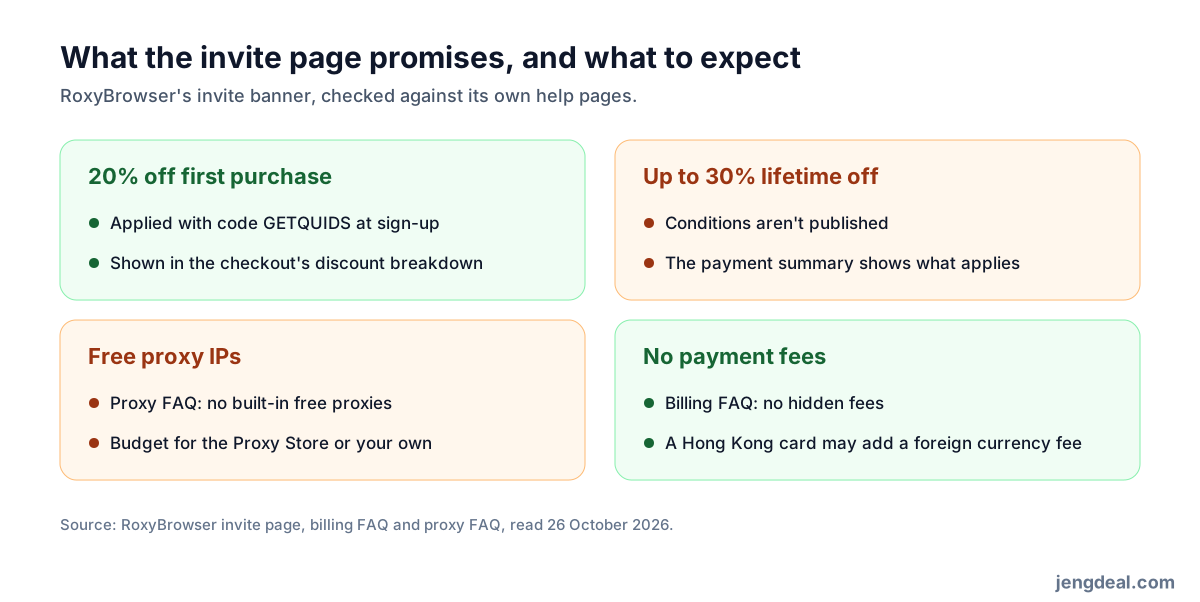
The same page's headline says "Sign Up Now for Up to 30% Lifetime Off", but RoxyBrowser doesn't spell out the conditions behind the 30% or how it combines with the 20%. Checkout shows a discount breakdown and the final price before you pay, so that's where you see what you really get.
Full disclosure: GETQUIDS is our invite code, and RoxyBrowser pays us a commission on what you spend. It doesn't cost you a cent more.
3. The free plan and how pricing works
The pricing page lists a permanent free plan: two profiles, two projects, three days of logs and API access at 50 requests a minute, with no credit card, and you can still customise every fingerprint setting. One FAQ says three free profiles instead, so go by the pricing page. Paid plans are banded by profile count: on Basic, US$0.80 each for the first 10, US$0.25 for 11 to 50 and US$0.20 for 51 to 100, down to US$0.03 at Enterprise; past 100 you buy in blocks of 100.
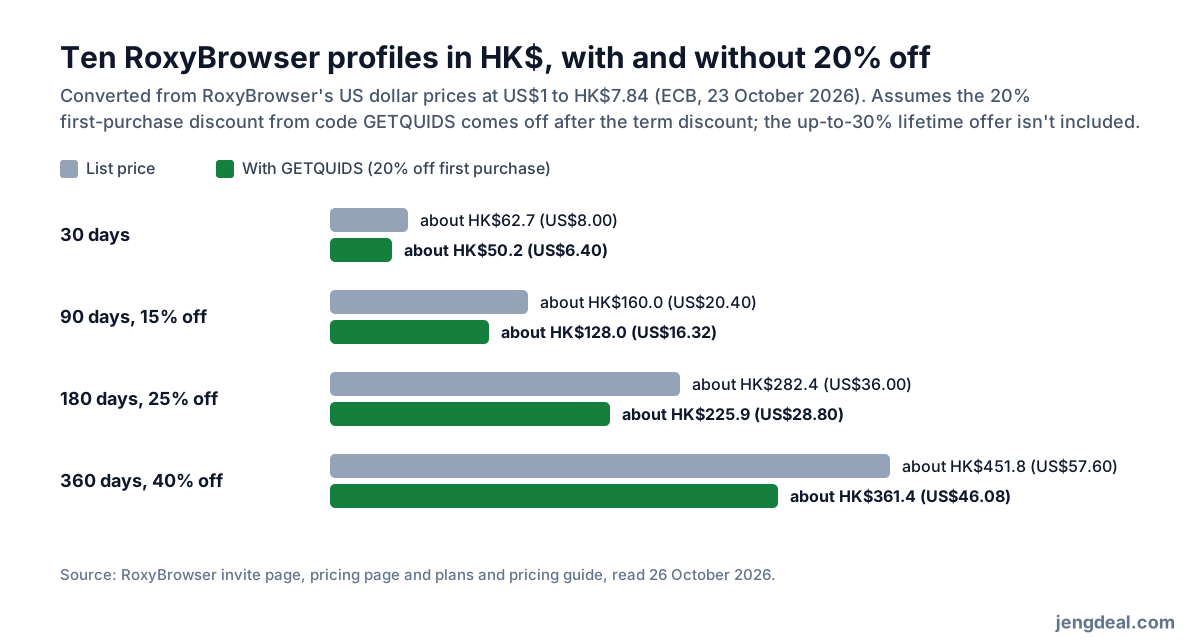
Terms run from 1 to 360 days: 15% off for 90 days, 25% for 180 and 40% for 360. Team member seats are US$5 (about HK$39) each and extra teams US$10 (about HK$78), paid once and valid forever. Switch on auto-renewal for another 7.5% off at renewal; it takes your wallet balance first and charges your card only if that runs short.
4. In Hong Kong dollars, what do you save?
At the European Central Bank rate of 23 October 2026 (US$1 is about HK$7.84), ten profiles for 30 days cost US$8.00, about HK$62.7; with 20% off your first purchase that's US$6.40, about HK$50.2, saving about HK$12.5. The discount is for your first order, so a longer first plan saves more: a 360-day plan at 40% off is US$57.60, about HK$451.8, and 20% off that knocks off US$11.52, about HK$90.4.
How much you save depends on how much you spend: a team buying hundreds of profiles saves a decent chunk, while a solo user with ten profiles saves somewhere between HK$12.5 and HK$90.4. The free plan already covers testing, so make your first purchase the plan you really want. If you wouldn't buy without the code, it's worth nothing to you.
5. What the invite page's other promises mean
The invite banner also lists "Free Proxy IPs". RoxyBrowser doesn't say how many, and its proxy FAQ says it has no built-in free proxies, so budget for proxies from its Proxy Store or bring your own. The browser doesn't change your IP by itself, so every profile needs one.
"No Payment Fees" matches its billing FAQ, which says there are no hidden fees, but pay in US dollars with a Hong Kong credit card and the card may add a foreign currency fee. Also, plans and team seats can't be refunded once activated, so the discount never turns back into cash.
6. How to pay
RoxyBrowser prices in US dollars and takes credit cards, Alipay, WeChat Pay and USDT (TRC20); wallet top-ups go in multiples of 10. Alipay or WeChat Pay saves digging out a credit card, but your payment app's exchange rate and fees apply.
Paying with USDT? Be careful: the amount you send has to match the order exactly and the receiving address needs double-checking, or the payment may be delayed and need support to sort out; pay after the order has expired and the system won't credit it automatically.
7. The ban risk is all yours
Platforms like Amazon, eBay, Etsy and Shopee restrict one person or business from running several accounts, and RoxyBrowser's own pages say so. Its terms are crystal clear: the risk of operating on third-party platforms is entirely yours, it won't promise your accounts won't be suspended, and bans, frozen funds or lost business aren't its problem.
RoxyBrowser also says it doesn't support breaking other platforms' terms and can close your account on the spot, without a refund, if it catches you. Before you pay, read each platform's rules one by one; if a platform bans multiple accounts, no browser changes that.
8. No refunds, and what happens when it expires
RoxyBrowser treats paid plans as digital subscriptions: once bought and activated, no refund; team seats can't be refunded or cancelled either. It even recommends testing on the free version before subscribing.
When a subscription runs out, your profiles and settings are kept, but until you renew you can only open the two you created first. Adding profiles mid-term costs the difference and works straight away; cutting profiles on an auto-renewing plan kicks in next cycle and removes access by creation date; fixed-term plans can't be cut at all.
9. Support and what users say
Support runs on live chat and Telegram from 9am to 10pm UTC+8, which is Hong Kong time, so it fits Hong Kong hours nicely; RoxyBrowser says replies usually come within 60 seconds in that window, and you can also email [email protected].
There's no mobile app, so no App Store ratings. On 26 October 2026 its Trustpilot page had 22 reviews and a 4.3 score, 91% five-star and 9% one-star; most are short five-star posts from accounts with a single review, and it hadn't replied to the negative ones. Its own figures don't line up either: the pricing page says two free profiles, an FAQ says three, the invite page shows up to 30% lifetime off without saying how, and the banner's free proxy IPs clash with an FAQ saying there are no built-in free proxies. In the end, go by the payment summary.
10. Who it suits, and who can skip it
It suits you if you already need isolated browser profiles for client accounts, several online shops, testing or automation, the platforms allow it, and you'd pay anyway. Play with the free plan first, and use GETQUIDS when you upgrade.
Skip it if you just want private everyday browsing, your business relies on accounts a platform forbids, or you're only thinking of buying because of the discount. On a first ten-profile plan, the code saves about HK$12.5 for 30 days or HK$90.4 for 360 days, that's all.
FAQ
- What do I get with GETQUIDS?
- 20% off your first purchase, as RoxyBrowser's invite page says. It's a spending discount, not cash.
- What's the "up to 30% lifetime off" about?
- It's the invite page's headline, but RoxyBrowser doesn't publish the conditions. Check the discount breakdown at checkout before you pay.
- How many profiles does the free plan have?
- The pricing page says two, with API access and no credit card needed.
- How much are ten profiles?
- About HK$62.7 for 30 days, or about HK$50.2 with 20% off your first purchase; team seats are about HK$39 each, paid once.
- Are the proxy IPs free?
- Don't count on it. The banner says free proxy IPs, but RoxyBrowser's proxy FAQ says there are no built-in free proxies, so buy from its Proxy Store or use your own.
- Can I pay with Alipay or WeChat Pay?
- Yes, and credit cards and USDT work too; prices are in US dollars.
- Can I get a refund after buying?
- No. Plans and team seats can't be refunded once activated, so test on the free plan first.
- Does using it mean I won't get banned?
- No. The terms say the ban risk is yours, and some platforms flat-out forbid multiple accounts.