
Klook's HK$30 New-User Code: 10 Things to Know Before You Use It
Who's behind Klook, how to grab the HK$30, why the code can get used up on its own, what happens if you cancel, how much KlookCash you earn, how long refunds take and what users moan about, all in one place.
Last updated 24 October 2026

Best for
Hongkongers who are always on Klook for theme-park tickets, staycations, Japan and Korea trips and eSIMs, and want it all sorted in one app.
Klook is a licensed Hong Kong travel agent that focuses on Asia, and paying in Hong Kong dollars lets you use Octopus, PayMe, Alipay and WeChat Pay, so buying tickets and tours is easy. Open a new account through our link and the HK$30 code lands the moment you sign up. On a HK$300 ticket that's about 10% off, a nice little win, but don't rearrange your trip for it. What really counts is each product's cancellation terms, and whether Klook actually beats the official site. Sign up through our link, check the minimum spend and expiry under Promo codes first, then use it on a booking you're sure you won't cancel.
Pros
- Tickets, tours, train tickets, eSIMs, airport transfers and hotels, all from one account
- Sign up through our invite and the HK$30 code is yours straight away, no booking needed first
- Paying in HK dollars? Octopus, PayMe, Alipay, WeChat Pay and UnionPay QuickPass all work
- No handling fee on activity bookings, and instant-confirmation products sort themselves out in about five minutes
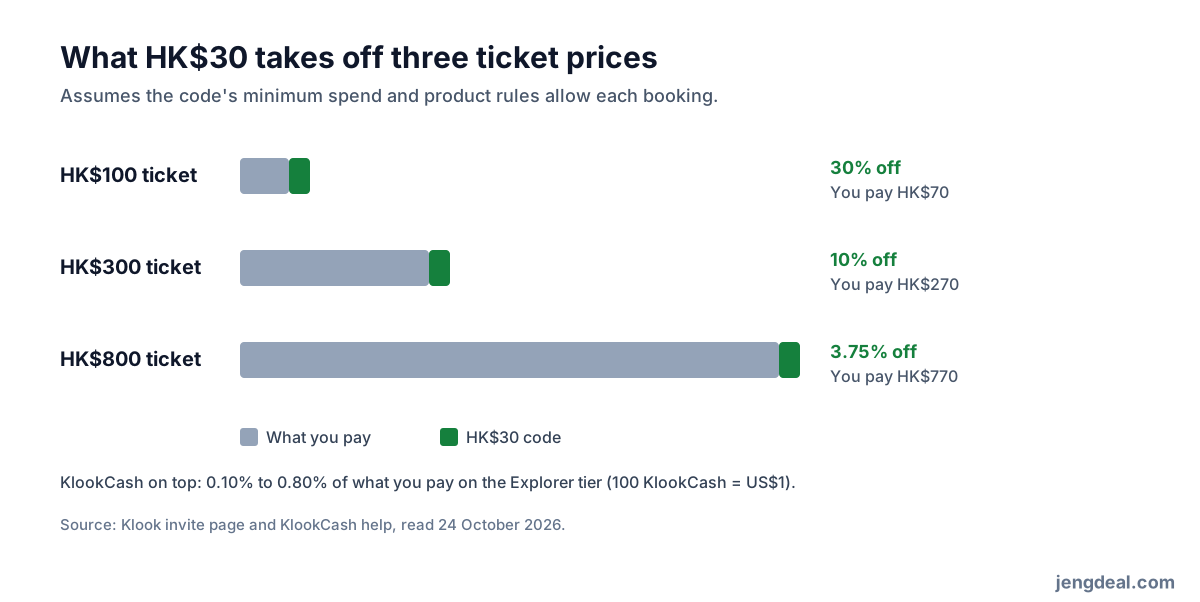
- Even the entry tier gets 0.10% to 0.80% back as KlookCash (100 KlookCash = US$1)
- Written promises cover you for vouchers that fail at the gate, overbooked hotels and operators cancelling within 24 hours
Watch-outs
- Klook's public pages don't say what the HK$30 code's minimum spend, eligible products or expiry are
- Codes saved in your account apply themselves to eligible bookings, so one slip and it's gone on the wrong order
- One-time codes don't come back after you cancel
- Non-instant products take 24 to 48 hours, and some get cancelled while you wait
- Refunds depend on the operator's terms, and money back to a card takes 7 to 14 business days
- Hot event tickets are hard to get, and if the event is a mess, refunds are up to the organiser
Current related offer
Klook offer pageAd / referral links — we may earn a bonus when you sign up.
Provider
Klook
Got a trip planned? Sign up through the invite (code U6BZD) and Klook drops a HK$30 promo code into your new account straight away; its minimum spend, eligible products and expiry sit on the code under Account > Promo codes. It applies itself to eligible bookings, so just glance at the Discounts section before you pay.
Requirement: Register with invite code U6BZD; the HK$30 code applies to eligible bookings
Easy5 minutesPayout HK$30 promo code added as soon as you sign up through the invite
Verified 24 October 2026
Full claim instructions are on the Klook offer page.
1. Who's behind Klook?
Klook started in Hong Kong in 2014, and the app comes from Klook Travel Technology Limited. The company holds a Hong Kong travel agent's licence, number 354005, has its head office on the 22nd floor of Kinwick Centre, 32 Hollywood Road, Central, and is licensed for outbound, inbound and local travel.
Klook sells some products itself and others on behalf of operators, so how the day goes and how you get in is up to the venue, tour company or transport operator. Every product shows its cancellation policy before you pay, and that's what decides whether you get your money back, not some general Klook rule.
2. What's it good for?
Theme-park and attraction tickets, local and overseas tours, train tickets and passes for Japan and beyond, eSIMs, airport transfers, car hire, hotels and some flights. Hongkongers mostly use it for local attractions, staycations and trips to Japan, Korea, Taiwan and South-East Asia.
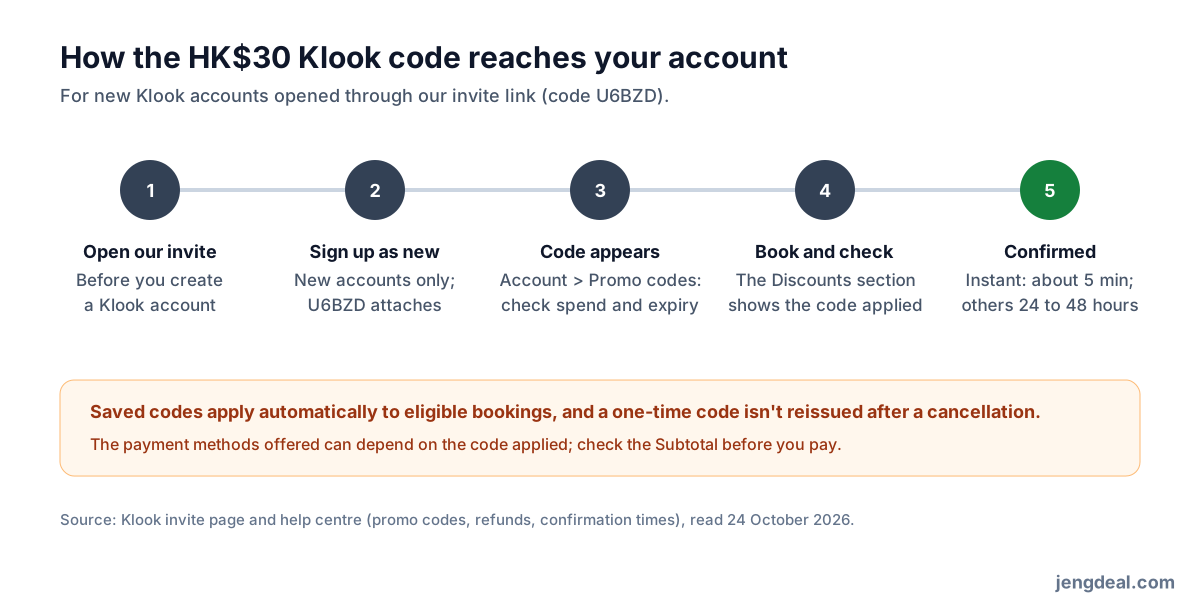
Products marked instant confirmation send a confirmation email in about five minutes; the rest take 24 to 48 hours. All your e-tickets live in the app, and eSIMs install from Account > Bookings with Add eSIM to device. Install and test it in Hong Kong before you fly.
3. How do I get the HK$30?
Klook's invite page spells it out: new users who sign up through an invite get a HK$30 promo code the moment they register. Before you open a Klook account, tap our invite link; it already carries the code U6BZD, and if the sign-up page asks for an invite code, pop in U6BZD. New accounts only, so you can't add it to an old one.
Disclosure: U6BZD is our invite code. Once you've signed up and finished a booking, Klook gives us a HK$30 reward too; Klook says it lands within 24 hours of your booking being completed, meaning the ticket's been used and the activity's done (Klook help).
4. What's the code really worth?
Assuming your booking meets the minimum spend and the product qualifies, HK$30 knocks 30% off a HK$100 ticket, 10% off a HK$300 one and just 3.75% off a HK$800 one. The cheaper the thing, the better the deal in percentage terms, but if the minimum spend is higher than the ticket price, you can't use it at all. Check the Subtotal at checkout before paying to see exactly what comes off.
The code costs you nothing, so grab it, but don't let it choose the product. Compare with the official site first: if it's HK$50 cheaper there, that already beats HK$30 off on Klook, and a ticket you can reschedule is sometimes worth more than a discount on one you can't refund.
5. The code can use itself up!
After you sign up, the page tells you the code is in your account and nudges you to the app. Klook's public pages don't list the code's minimum spend, eligible products or expiry; the code itself does. On the website, tap your account icon and choose Promo codes; in the app, it's the Promo codes banner at the top of the Account page (Klook help).
Here's the classic trap: Klook automatically applies codes saved in your account to eligible bookings, and the Discounts section at checkout shows which one is in use (Klook help). If your first booking is just an Airport Express ticket, your HK$30 can vanish right there. Until it's gone on the booking you actually want, glance at the Discounts section every time you pay.
6. Cancel, and the code doesn't come back
If you cancel, any KlookCash you used comes back automatically, but a one-time promo code doesn't; codes that aren't one-time go back into your account (Klook help). Check which type yours is on the Promo codes page and save it for a booking you're confident won't be cancelled. Don't roll the dice.
7. Paying and fees
Klook charges no handling fee on activity bookings (Klook help). But if you pay in a currency other than your card's own, your bank may add a foreign transaction fee, and Klook warns PayPal can carry extra charges too, so paying in Hong Kong dollars is the safe bet.
Pay in HK dollars and, as well as Visa, Mastercard, American Express, JCB and UnionPay cards plus Apple Pay and Google Pay, you can use Octopus, PayMe, Alipay, WeChat Pay and UnionPay QuickPass (Klook help). What's on offer depends on the currency, location, amount, the code you've applied and the product, and you can't split one booking across two payment methods.
8. How much KlookCash do you get back?
KlookCash is Klook's own reward credit: 100 KlookCash equals US$1 and knocks money off a later booking (Klook help). Since 12 March 2026, completed bookings earn 0.10% to 0.80% of what you paid on the entry Explorer tier, 0.28% to 2.40% on Gold and 0.48% to 4% on Platinum, depending on the product (Klook help); e-gift cards, coupon packs and free bookings earn nothing.
Reviews pay too: for your first ten each month, a Chinese review of 40 characters or more earns 20 KlookCash, and adding three or more photos earns 30. On the Explorer tier, a HK$270 booking earns roughly 3 to 28 KlookCash, about HK$0.27 to HK$2.16. You need at least 10 to spend it, it doesn't work on Klook Passes, e-gift cards or travel insurance, and it expires 365 days after you earn it (Klook help).
9. How long do refunds take, and how does Klook have your back?
Once a refund is approved, Klook processes it within 24 hours. Back to a card, Apple Pay or Google Pay takes 7 to 14 business days; paid from an e-wallet balance, 1 to 3 days, or 7 to 14 business days if you used a card linked to the wallet; bank transfers take 14 to 30 business days (Klook help). Turn up late or not at all and the product's own policy applies, which usually means no refund.
Klook has written customer promises (customer promises). If a ticket fails at the gate because of Klook's mistake and it isn't fixed within 15 minutes, buy one on the spot: Klook refunds your booking and covers the difference if the gate price is higher. If a tour is way off its description, or the operator cancels within 24 hours, you get a full refund plus reasonable compensation. Hotel overbooked, no hire car, driver a no-show? Klook helps you rearrange.
There are limits, though. Miss something because your flight was delayed or you got sick, and Klook waives its own fees and pleads your case with the operator, but the operator has the final say. If a typhoon or government order shuts the venue, you get a full refund or a new date; but if a typhoon signal in Hong Kong just cancels your flight while the place you're going stays open, the normal cancellation policy applies, and that's what travel insurance is for.
10. What do users moan about most?
On 24 October 2026, the Klook app had 4.7 on the Hong Kong App Store (39,016 ratings) and 4.7 on Google Play in Hong Kong too (148,661 ratings worldwide). The praise is mostly about choice and convenience.
The usual one-star gripes: hot events selling out in seconds, with people feeling the platform can't keep the bots out; chaotic events with no refunds; hotel bookings cancelled after payment, then a long wait for the money; saved codes auto-applied to cheap orders; some tickets asking for a mountain of personal details; and very little flexibility to change dates. How to dodge it: pick instant-confirmation products, screenshot the cancellation terms and check which code is applied before you pay.
Who should jump in, and who can skip it
If you're booking several paid attractions, a theme park, an eSIM or airport transfers and want them all in one app with instant e-tickets, Klook suits you nicely. The HK$30 is just a little sweetener on your first booking.
If the official site is cheaper, your plans might change and the Klook option is non-refundable, or you need a complicated rail itinerary, compare first or buy straight from the operator. And when you're chasing hot event tickets, remember the organiser, not the platform, is responsible for how the event goes.
FAQ
- How much is Klook's new-user code worth?
- Open a new account through our invite and you get a HK$30 promo code the moment you sign up. Check the Subtotal at checkout to see exactly what comes off.
- Do I have to type U6BZD myself?
- Tap our invite link before you open the account and it links up automatically; if the sign-up page asks for an invite code, enter U6BZD.
- Where's the code after I sign up?
- On the website, tap your account icon and choose Promo codes; in the app, tap Account, then the Promo codes banner. The code shows its minimum spend, eligible products and expiry.
- I already have a Klook account. Can I still get it?
- Nope. The invite code is only for new accounts opened through the invite link.
- Can the code get used up on its own?
- Yes. Klook automatically applies saved codes to eligible bookings, so check the Discounts section before you pay for anything cheap.
- I cancelled my booking. What happens to the code?
- One-time codes aren't reissued, other codes go back to your account, and any KlookCash you used comes back automatically.
- Can I pay with Octopus or PayMe?
- Paying in HK dollars, you can use Octopus, PayMe, Alipay, WeChat Pay and UnionPay QuickPass, plus cards, Apple Pay and Google Pay; what shows up depends on the product, the amount and the code applied.
- How long does a refund take?
- Klook processes it within 24 hours of approval; money back to a card then takes 7 to 14 business days, or 1 to 3 days to an e-wallet balance.