

Is Honeygain Worth It? 10 Things to Know Before Your Spare Broadband Earns US Dollars
The quick Honeygain guide for Hong Kong: how it uses your connection, what it really pays a month, how long US$20 takes, cashing out by PayPal, Content Delivery, and the broadband-contract and IP-blocklist risks.
Last updated 14 November 2026

Honeygain
Ad / referral links — we may earn a bonus when you sign up.
Full details & steps →Best for
Hong Kong folks with a Windows or Mac computer that's usually on, unlimited home broadband that allows sharing, and no problem with business traffic going out through their IP for a few US dollars of pocket money a month.
Honeygain does pay, just painfully slowly. Even with the US$3 (about HK$23) welcome credit you're 17,000 credits short of the US$20 cash-out: around 4 months if a computer holds a Content Delivery spot all month, nearly a year on ordinary sharing, and your first payout nets about HK$140 after the fee. The real price isn't money, it's your IP carrying strangers' traffic. Check your broadband contract first, and don't bother if you need a clean line for work, online banking or streaming.
Pros
- US$3 (about HK$23) free through our link, so you start 15% of the way to the first cash-out
- Set it and forget it: no surveys, no tasks, no ads
- Content Delivery works in Hong Kong, paying a Windows or Mac computer a fixed 6 credits an hour while Active
- Once Tipalti's sorted, PayPal lands in about 2 to 3 business days for a flat US$2.02
- Runs on Windows, macOS, Android and Linux, so that old laptop or spare Android phone can earn its keep
Watch-outs
- Small and patchy pay: no published rate, roughly US$0.10 per GB by a June 2026 estimate, usually a few US dollars a month per device
- Business traffic exits through your home IP, so expect more CAPTCHAs, a possible blocklist entry and the odd site refusing to load
- Security firms call apps like this riskware, and a 2026 investigation spotted traffic tied to a US-sanctioned bank on its test line
- US$2.02 off every payout, and taking Hong Kong dollars costs you on the exchange rate
- Your broadband contract may not allow it, and on mobile data you can easily end up out of pocket
- Trustpilot hid its rating after deleting fake reviews, and support takes 4 to 5 business days to reply
Current related offer
Honeygain offer pageAd / referral links — we may earn a bonus when you sign up.
Provider
Honeygain
Sign up through our link and 3,000 credits (US$3, about HK$23) land straight in your balance, already 15% of the way to the US$20 cash-out. After that it's slow and steady: sharing your connection with Honeygain's business clients usually makes a few US dollars a month per device.
Requirement: Free to join. You need a Windows, Mac, Android or Linux device plus a home or mobile connection whose contract allows sharing; your balance, US$3 included, has to hit US$20 (about HK$156) before you can cash out
EasyAbout 5 minutes to sign up and install, then it runs in the backgroundPayout The US$3 credit lands when you sign up through the invite. Cash-outs start at US$20; after the one-off Tipalti sign-up, PayPal pays in about 2 to 3 business days
Verified 14 November 2026
Full claim instructions are on the Honeygain offer page.
1. What it is: a residential proxy network
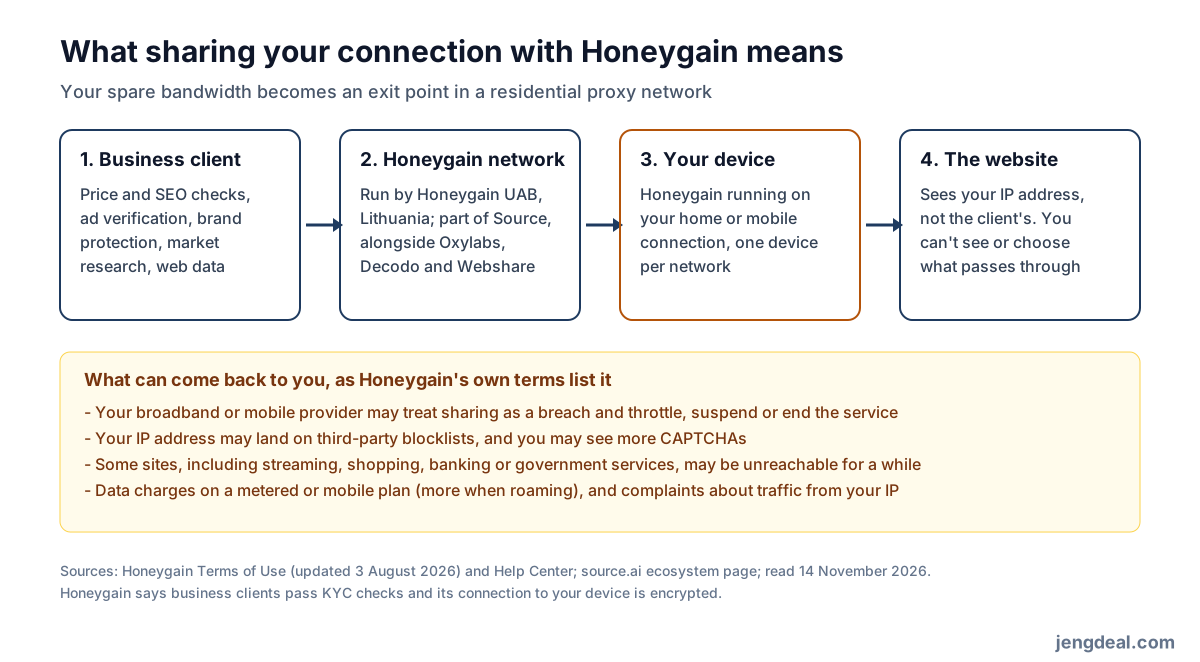
In plain terms, Honeygain lets companies borrow your internet line to send traffic and pays you a little for it. It's run by Honeygain, UAB of Vilnius, Lithuania, which launched the app in 2019 and now belongs to the Source group alongside proxy and web-data firms Oxylabs, Decodo, Webshare and ScrapingBee. Source puts it bluntly: people share bandwidth for rewards, and the network they make up is a residential proxy pool. Credits work out at 1,000 to US$1, and the official site claims over 60 million users and an average payout of US$27.
2. Who actually uses your line
Honeygain's terms list clients doing web and market analytics, SEO monitoring, brand protection, market research and cybersecurity, plus ad verification, collecting public web data and connecting to streaming services. When they go online through your device, the website on the other end sees your home IP, not theirs. Clients don't know whose line they're on, and you can't see or pick what goes through.
Honeygain says every client fills in KYC forms, that the link to your device is encrypted, and that it joined the anti-malware testing group AMTSO in 2025. Still, at the end of the day the website thinks it's you browsing. That's worth thinking through more than the money.
3. The US$3 welcome credit: a head start, not cash
Sign up through our Honeygain link and Honeygain drops US$3 worth of credits (3,000 credits, about HK$23) into your new account. The link on this page is ours. Only brand-new accounts made through the invite get it, so existing users miss out, and opening a second account to grab it breaks the one-account rule. Remember the US$3 counts towards the US$20 cash-out and can't be withdrawn alone; switch to JumpTask mode later and it still stays in your Honeygain balance.
4. How much a month? Honestly, not much
Honeygain doesn't publish a fixed rate for ordinary sharing. What you make depends on how much Hong Kong traffic clients want at the time and how many people nearby are sharing, not on how fast your broadband is or how much you browse. It also warns that new accounts often get extra traffic in their first 1 to 2 weeks while checks run, so a strong start doesn't mean it'll last. A June 2026 Digital Citizens Alliance report estimated about US$0.10 per GB shared, and even the user quote on Honeygain's own homepage calls about US$20 every few months realistic.
5. How long until US$20?
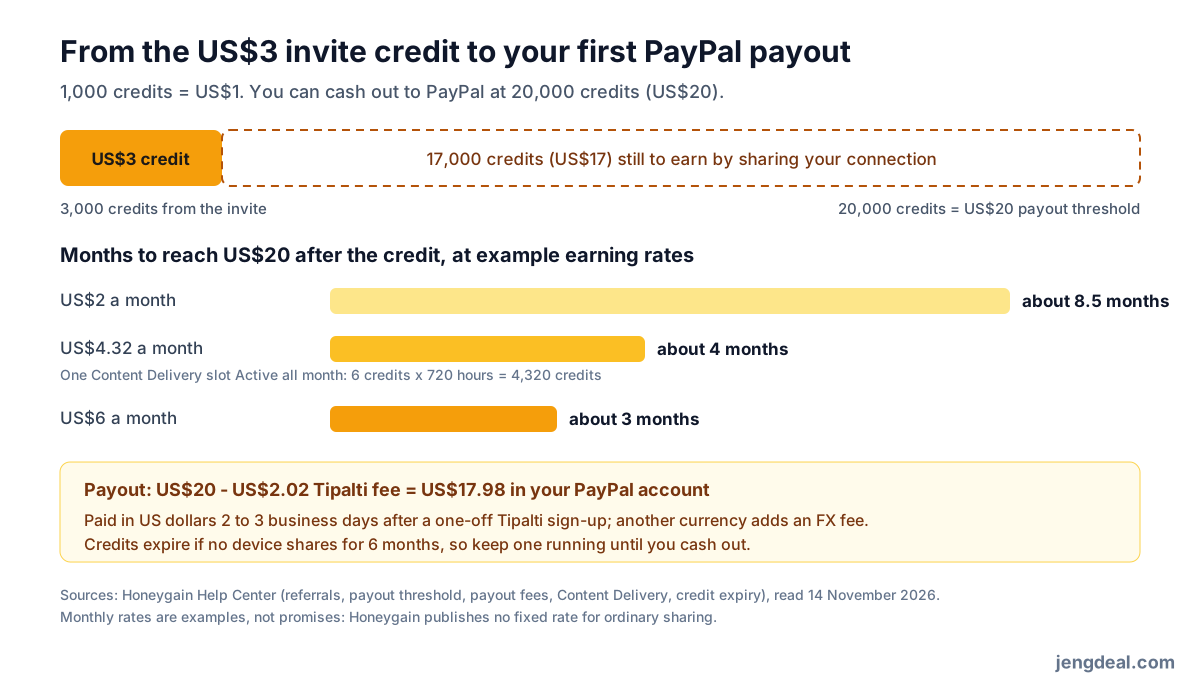
The steadiest earner is Content Delivery: a Windows or Mac computer earns a fixed 6 credits an hour while Active, whatever the traffic. Hold a spot for a full 30 days and that's 4,320 credits, about US$4.32 (about HK$34), plus 5% in Honeygain mode. But if your computer's only on 10 hours a day, it's more like 1,800 credits (about US$1.80) a month. Do the maths after the US$3: about 8.5 months at US$2 a month, about 4 at US$4.32 and about 3 at US$6. And factor in electricity: if a computer stays on only for Honeygain, the power bill can easily swallow what it earns.
6. Cashing out: PayPal through Tipalti
Hit US$20 (20,000 credits), tap Payout on the Dashboard, pick PayPal and enter the code from your email. Tipalti then emails an invite within a business day, and you only register once: set a password, enter a text-message code and match your PayPal details exactly. Money lands about 2 to 3 business days after that, minus US$2.02 a time, so US$20 nets US$17.98 (about HK$140). Hong Kong isn't on Honeygain's restricted list, but Honeygain suggests checking Tipalti's payment methods list to confirm PayPal works; payouts are in US dollars, and picking Hong Kong dollars adds a conversion fee.
Two deadlines to remember: a payout that isn't finished within 3 months (usually a half-done Tipalti sign-up) may be written off under the terms, and if a payout amount looks wrong you have 60 days to tell Honeygain. The other route is JumpTask mode: new earnings go to a separate JumpTask account and swap for gift cards from US$0.50, but you lose the 5% Honeygain-mode bonus and the US$3 doesn't come with you.
7. Which devices? And how does Content Delivery work?
Honeygain runs on Windows 7 or later, macOS 10.15 or later, Android 5.0 or later, and Linux through Docker. No iPhone or iPad app, and Google kicked the Android app off Google Play under its Device and Network Abuse policy, so Android users install it from Honeygain's website, and only there. One account can link up to 10 devices, but only one per network earns: a computer and phone on the same home Wi-Fi count as one, and the second shows "Network overused".
Content Delivery needs Windows or macOS, a normal ISP or mobile IP, and you in one of 45 countries and regions, Hong Kong included. It moves heavier stuff like video and big websites, so your data use climbs noticeably, and Honeygain admits that now and then a client using a Content Delivery member's line to reach a streaming platform leaves that member temporarily locked out of it.
8. Broadband contracts, IP blocklists and the security reports
Every time the app runs, Honeygain's terms have you confirm that your broadband or mobile contract doesn't ban sharing, that the line is yours or the account holder agrees, and that it isn't an office, school, library, hotel or other public network. They then spell out what can happen: your provider can throttle, suspend or cut your service; metered or mobile plans can rack up data charges, more when roaming; your IP may land on third-party blocklists; you'll see more CAPTCHAs; streaming, shopping, banking or government sites may not load for a while; and you might get complaints about traffic from your IP.
On security, in February 2023 Trend Micro labelled bandwidth-sharing apps, Honeygain included, as riskware after seeing SMS-verification abuse, SQL-injection probing, attempts to read system password files and crawling of government sites on its network. In June 2026 the Digital Citizens Alliance and risk3sixty ran Honeygain on a test line for several days and saw connections involving entities in China and Russia, including traffic tied to a bank sanctioned by the US Treasury; the report found no sign Honeygain knew what those connections were for.
9. Complaints, bans and expiring credits
On 14 November 2026 Trustpilot showed no Honeygain rating, citing a breach of its guidelines and saying it had deleted a batch of fake reviews, leaving 22,565. Recent one- and two-star reviews keep circling the same things: far lower earnings than expected, fees and the exchange rate eating the first US$20, bans or slow payouts around cash-out time, slow support and antivirus warnings. The slow support is real: in November 2026 the help centre said replies take 4 to 5 business days. Bans come from an automated anti-cheat system that won't tell you why; you can appeal, but credits earned before a ban are gone.
What gets you banned is spelled out: several apps on one IP, a VPN or proxy, selling or sharing your account, public Wi-Fi, data-centre lines, phone hotspots and extra accounts for rewards; you also need to be 18+. Credits expire after 6 months with no device sharing, and once you're over US$20 you've got 24 months to cash out. Calling it quits? Cash out first if you're at US$20, then delete the account in Profile settings and confirm by email; the balance goes with it, so uninstall the app on every device too.
10. Who should play, and who should skip it
Good fit: your Windows or Mac computer is on most of the time anyway, your home broadband is unlimited and allows sharing, and a few US dollars a month for zero effort sounds fine. Turn on Content Delivery, keep one device per network and open your account through our link so the US$3 gets you started. Skip it if: you're on a capped or mobile-only line, you work from home on a line your employer depends on, you share broadband without the account holder's OK, or you can't stand banks, streaming apps and websites eyeing your IP suspiciously. Want real money? An hour on a bank welcome offer can beat a whole year of Honeygain.
FAQ
- Is Honeygain a scam?
- No. Honeygain, UAB is a registered Lithuanian company in the Source group with Oxylabs, and it really does pay by PayPal at US$20. Not a scam doesn't mean no side effects, though: its whole business is selling your IP's traffic to companies, which is why security firms call it riskware.
- How much can I make a month in Hong Kong?
- There's no official rate. A June 2026 investigation estimated roughly US$0.10 per GB; a computer holding a Content Delivery spot all month adds 4,320 credits, about US$4.32 (about HK$34). Most people get a few US dollars a month per device.
- How long until I can cash out US$20?
- With the US$3 welcome credit you still need 17,000 credits: about 8.5 months at US$2 a month, about 4 at US$4.32 and about 3 at US$6.
- Can Hong Kong people get paid by PayPal?
- Hong Kong isn't on Honeygain's restricted list, and PayPal goes through Tipalti; Honeygain suggests checking Tipalti's list first. No PayPal? Turn the US$20 into JumpTask credits and swap them for a gift card through GIFQ.
- Does it work on iPhone?
- Nope. Only Windows, macOS, Android (from the official site, not Google Play) and Linux through Docker.
- Will it slow my broadband or eat my data?
- Honeygain says it only uses spare bandwidth, but your data use does go up, especially with Content Delivery. Unlimited home broadband is mostly fine; on a capped mobile plan you can end up paying more than you earn.
- Can I run it with a VPN on?
- No. VPNs and proxies are banned and get you suspended, and most VPNs use data-centre IPs Honeygain won't accept. If one was on for a moment by accident, switch it off straight away.