

Is HeyClicky Worth It? 10 Things Hong Kong Users Should Know Before Paying for the AI That Watches Your Screen
What HeyClicky is, what happens when you hit the hotkey, what its agents do, picking Free (midnight reset), Pro (50× Free) or Max (250× Free), how much 25% off month one saves, where your screen data goes under the 10 November 2026 terms, Hong Kong & Cantonese testing, paying and cancelling, and who should skip.
Last updated 17 November 2026

HeyClicky
Ad / referral links — we may earn a bonus when you sign up.
Full details & steps →Best for
Hong Kong Mac and Windows users who are always learning new software, or want a helper to sort out small jobs across Gmail, Calendar and Notion, don't mind screenshots going up to cloud AI when they ask, and will try the daily free tier first to check it works from Hong Kong.
HeyClicky is a voice assistant that only looks at your screen when you hit the hotkey, talks back in 133 languages and draws on screen where to click; bigger jobs go to an agent inside your apps. Free costs zero, links up to 2 apps and resets a shared daily allowance at midnight — plenty to test whether it clicks with you in Hong Kong and Cantonese before spending a cent. Through our link, Pro (50× Free usage, 100+ apps) starts at US$15 instead of US$20 (about HK$118 vs HK$157) and Max (250× Free) starts at US$75 instead of US$100 (about HK$588 vs HK$785); full price after that. Heads-up: everything runs in the cloud via OpenAI, Anthropic and Google (with Cerebras, Groq and Deepgram for dictation), none of the reasoning providers supports Hong Kong natively, there's still no SOC 2 audit, and under the 10 November 2026 Terms fees are non-refundable unless the law requires otherwise. Our take: mess around on the midnight-resetting Free tier first, step up to Pro only when you keep bumping the cap, and don't pay a year up front blindly.
Pros
- 25% off month one of monthly Pro (US$15) or Max (US$75) through our link
- Midnight-resetting Free tier with up to 2 apps and zero card, ideal for testing Hong Kong routing first
- Only watches your screen on hotkey trigger, and raw screenshots are never stored on HeyClicky's servers
- Speaks 133 languages, dictates in 83 via Google's speech model, and sports an 18-language app UI
- Pro/Max connect 100+ apps via Composio (Gmail, Calendar, Notion, Linear, Apple apps), run in Chrome and drive your Mac once you say yes
- Monthly plans, one-click cancel, plus published Terms of Service and Privacy Policy (updated 10 November 2026)
Watch-outs
- Discount covers month one only; full whack (Pro US$20 / Max US$100) kicks in from month two
- Talk and agents draw from one shared percentage cap; burning through Pro means a US$10 reset or Max
- Anthropic and OpenAI both exclude Hong Kong, so everything hangs on HeyClicky's server routing
- All cloud processing with no SOC 2 or ISO 27001 certification yet
- 10 November 2026 Terms lock in non-refundable fees unless law says otherwise, with zero rollover
- Charged in US dollars, so your Hong Kong card may slap on a foreign-currency fee
Current related offer
HeyClicky offer pageAd / referral links — we may earn a bonus when you sign up.
Provider
HeyClicky
Calling all Mac and Windows users! HeyClicky is an AI buddy living inside your Mac or Windows PC — hit the hotkey and it sees your screen, teaches you any app, even draws on your screen to show you the way; feeling lazy, just say “agent” and it does the task for you. Sign up through this link and get 25% off your first month of Pro ($20/month) or Max ($100/month)! Free resets its shared daily allowance every midnight with up to 2 apps — plenty to play with before spending a cent — while Pro includes 50× Free usage, 100+ apps, unlimited dictation and $10 resets, and Max includes 250× Free.
Requirement: A Pro ($20/month) or Max ($100/month) subscription — 25% off the first month
Easy5 minutes to sign up via the linkPayout 25% off applied automatically to your first Pro/Max month
Verified 17 November 2026
Full claim instructions are on the HeyClicky offer page.
Thing 1: What is HeyClicky?
HeyClicky is a desktop AI companion. Tap the hotkey and talk: it grabs your screen, works out what you're staring at, answers out loud and draws where to click; ask it to take action and it spins up an agent inside your apps. HeyClicky now claims over 80,000 users.
Behind it is Humansongs, Inc., a Delaware corporation in San Francisco out of Y Combinator's Spring 2026 batch. Macs need macOS Sonoma 14.2 or later; since version 1.1.1 on 23 October 2026, Windows 10 or later joins the party. You skip the app stores and grab it straight from heyclicky.com: a disk image for Mac or signed setup file for Windows.
Thing 2: Hit the hotkey, ask away, and it teaches you right on screen
Talk comes first: hit the hotkey, ask how to do anything in the frontmost app, and it guides you in 2D or 3D right across your screen while saving those sketches in chat to replay later. Speech spans 133 languages, dictation runs 83 languages on Google's latest speech model with mid-sentence language switching (added 30 October 2026), and since version 1.1.4 on 16 November 2026 the app UI itself speaks 18 languages including English and Chinese.
Since September it also runs Clickys and background jobs: always-on agents with names, memory and files that take repeating routines by voice. It swallows full documents, remembers style preferences like shorter replies, and lets you type or press your voice keys to nudge an agent.
Thing 3: Agents do the job for you, and can even drive your computer
Say "heyclicky agent" and an agent shows its plan and result tucked under your screen's notch; longer jobs hold history overnight and automatically retry across transient AI hiccups. Free hooks up to 2 apps while Pro and Max open 100+ integrations through Composio (Gmail, Google Calendar, Drive, Sheets, Notion, Linear, Apple Notes, Calendar, Reminders, Spotify, Stripe and Meta Ads) plus custom MCP connectors; Reddit and Monday remain pulled. Pair it with the Chrome Web Store extension and agents work inside signed-in tabs and upload files when approved, keeping clear of passwords, OTP codes and card boxes.
Give the nod and an agent drives your Mac directly. Move your mouse, speak or hit Escape to grab the wheel back; if a task needs a login or checkout click, it pauses and pops an Open page button for you. Unsure? It asks rather than winging it. Only wire up accounts you'd trust with a cautious temp.
Thing 4: Free, Pro or Max?
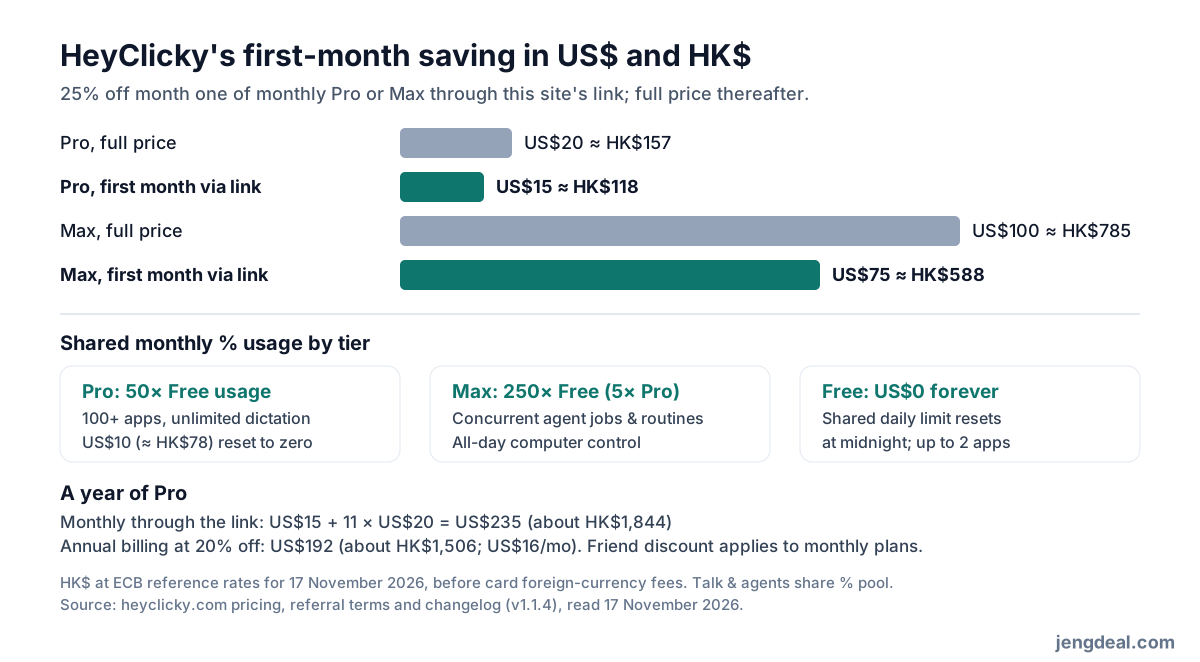
November 2026 replaced fixed message counts with one shared monthly percentage allowance covering talk and agents, tracked in the notch ring; agents chew through more than quick questions and the app warns before zero. Free (US$0 forever, zero card) grants a limited shared daily allowance resetting every midnight — voice replies, a few screen pointers and agents daily, plus up to 2 connected apps. Pro runs US$20 a month (about HK$157) for 50× Free usage, on-demand sketches, full walkthroughs, research/write/build agents, 100+ apps, unlimited dictation and US$10 (about HK$78) one-off resets to zero without changing your renewal date. Max costs US$100 a month (about HK$785) for 250× Free (5× Pro), simultaneous agent runs, unlimited routines and all-day computer driving.
Yearly billing cuts 20%: US$16 a month on Pro (US$192 a year, about HK$1,506) or US$80 a month on Max (US$960 a year, about HK$7,532). Team billing pools seats across Pro and Max, and students with a school email or ID score 50% off month one of Pro. Pre-16 November subscribers stay on legacy plans unless they email [email protected] to switch. No lock-in contracts on any tier.
Thing 5: Through our link, 25% off your first month
Click our link before spinning up your account, go monthly on Pro or Max, and month one drops 25%; the landing page names the referrer and displays your discount. Cookies hold attribution up to 60 days, and emailing yourself the download link hops attribution from phone to desktop for 60 days too. Nuke cookies or hop browsers mid-signup and it can vanish.
One referrer per account, locked before your first paid plan; team plans, self-referrals and account-to-account loops don't fly. This link is our referral link.
Thing 6: Do the maths
Through our link, Pro month one sits at US$15 instead of US$20, keeping US$5 (about HK$39) in your pocket; Max drops to US$75 from US$100, saving US$25 (about HK$196). Every Hong Kong figure follows the European Central Bank's 17 November 2026 rate before bank FX markups. Need one US$10 reset (about HK$78) during month one of Pro? Month one hits US$25 (about HK$196), or US$30 (about HK$235) in normal months — still miles cheaper than Max (US$100, about HK$785), unless you crave Max's 5× pool and parallel agents.
Across 12 months, monthly Pro via our link totals US$235 (about HK$1,844): US$15 first month plus eleven at US$20. Annual billing at 20% off sits at US$192 (about HK$1,506, or US$16 monthly), beating the link discount by US$43 (about HK$337) if you're locked in for a year; friend discounts only apply monthly. Play on the midnight Free plan first to see if it sticks.
Thing 7: Where does your screen data go?
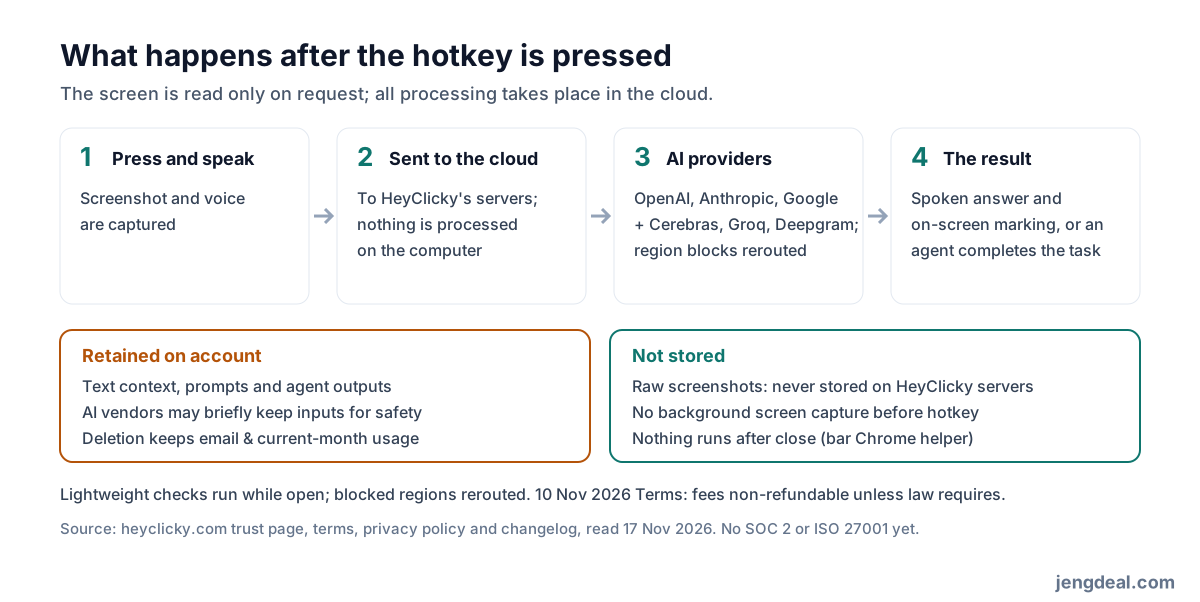
Nothing gets snooped in the background before you hit the hotkey: while open, HeyClicky only runs light background checks like spotting active calls (1.1.4 fixed FaceTime on its own triggering call mode) and scheduled routines, and closing the app leaves just a tiny Chrome extension helper if installed. Press the hotkey and screenshots plus voice head to HeyClicky's stack (Cloudflare, Supabase, Vercel) and straight to AI vendors — OpenAI, Anthropic and Google for thinking, Cerebras, Groq and Deepgram for dictation — with zero on-device inference. Searches hit Exa, Brave, Google or Wikipedia; Composio stores connected app tokens; Stripe, Loops, PostHog and Sentry manage payments, mail, telemetry and crashes blind to your screen; website ad pixels come from Meta, Google, LinkedIn and X.
HeyClicky says raw screenshots aren't stored on its servers, though AI vendors may briefly hold them for processing and safety filtering. Short text summaries, prompts and agent outputs live on your account, with zero model training on either side. Hitting Settings → Account → Delete Account or emailing [email protected] wipes connected apps and account info while hanging onto your email, exit reason, current-month usage (so people can't nuke accounts to farm free limits) and legally required payment logs. Still no SOC 2 or ISO 27001, so keep e-banking, medical records and client files off-screen.
Thing 8: Does it work in Hong Kong? Does it speak Cantonese?
Model selection stays hidden. Clickys run on OpenAI's GPT-6 Luna and GPT-6 Sol; realtime voice routes dynamically across OpenAI, Anthropic and Google; dictation switched to Google's latest speech model on 30 October 2026. Neither Anthropic nor OpenAI supports Hong Kong officially, so HeyClicky fires calls from its own backend and reroutes region-blocked traffic. Because HeyClicky skips publishing a country whitelist, that workaround could shift without warning.
For languages, speech reaches 133 languages, dictation hits 83 languages with mid-sentence switching, and since 16 November 2026 the UI includes "Chinese" among 18 languages — yet Cantonese isn't named explicitly. Test Cantonese voice questions and dictation on the Free tier before dropping a cent.
Thing 9: Paying, cancelling and refunds
Billing stays in US dollars, risking issuer FX spreads on Hong Kong cards. Cancelling takes a single click under Settings → Billing and runs out your paid period; full Terms of Service and Privacy Policy landed on 10 November 2026 (Delaware law; 13+, or guardian sign-off under 18), and section 6 spells out zero refunds unless required by law plus zero usage rollover. Card chargebacks stay your emergency exit for billing errors.
Delete accounts via Settings → Account → Delete Account or [email protected], leaving only legal billing records, email, exit reason and current-month usage. With zero Hong Kong office and email-only support, stick to monthly billing unless you're certain you want a whole year.
Thing 10: What have users run into?
Direct downloads mean zero App Store stars to scan; when checked on 24 October 2026, Trustpilot had no page and Product Hunt sat at 182 followers with zero reviews — comments mostly wished it would do tasks outright (fixed) or felt wary about screen access.
Its November 2026 changelog (through v1.1.4 on 16 November) reads like a live triage log: automatic retries and status alerts after the 9 November AI outage, Chrome extension file uploads, fixing FaceTime call false positives, trimming the notch for new MacBook Pro camera islands, plus Windows setup and Bluetooth chime tweaks. Glitches? Check the changelog first.
Who should give it a go, and who shouldn't
Constantly learning apps, want an agent clicking through Gmail, Calendar, Notion or Chrome on command, and cool with cloud screenshots when prompted? Worth a spin. Verify Hong Kong access and Cantonese on the midnight Free tier before upgrading through our link.
If client contracts, patient records or banking tabs live on screen, if compliance requires SOC 2 or ISO 27001, or if a plain chat box satisfies your workflow, leave it alone.
FAQ
- What's the deal through your link?
- 25% off month one of monthly Pro (US$15, about HK$118) or Max (US$75, about HK$588). Open our link before signing up.
- Does it work in Hong Kong?
- HeyClicky skips publishing a country list. Its AI providers exclude Hong Kong, while HeyClicky reroutes blocked calls; test Free first.
- Does it speak Cantonese?
- Speech supports 133 languages, dictation 83 languages and UI includes "Chinese", without explicitly confirming Cantonese. Try Free first.
- Is there a free version?
- Yep. Free needs zero card, links up to 2 apps and resets a small shared daily allowance at midnight.
- How do talk and agents split usage?
- November 2026 plans share one monthly percentage pool, where agents spend faster than chats. Pro includes 50× Free plus US$10 resets; Max has 250× Free and parallel runs.
- Does it work on Windows?
- Yes, Windows 10+ since 23 October 2026; Macs need macOS Sonoma 14.2+.
- Does it keep my screenshots?
- HeyClicky says raw screenshots aren't stored on its servers (vendors may briefly cache for processing and safety), while text context and prompts remain until deletion; current-month usage persists after deletion to stop free-tier resets.
- Can I cancel and claim a refund?
- One click stops future renewals while finishing the paid cycle. Under the 10 November 2026 Terms, fees aren't refundable unless law demands otherwise.