

Is the 759 Store app worth installing? Code CJXRFR34, 500 points for binding your card, and 10 things to know first
759 Online in one go: 1 point per HK$1, 500 points for binding a physical card, why the August launch bonus is gone, how to enter the invite code so it actually sticks, and what to do when the app won't open.
Last updated 24 October 2026
759 Store
CJXRFR34Ad / referral links — we may earn a bonus when you sign up.
Full details & steps →Best for
Anyone who raids 759 for snacks all the time and uses member coupons, or who has an old physical card at home, has never set up an e-membership, and can get to a shop to bind it before 31 December.
759 Online costs nothing: your phone shows a QR code that works as your member card, you earn 1 point per HK$1 in store, and there are stamps and coupons on top. But the August launch deal of 500 points plus 300 for an invite code ended on 23 August. The most useful thing right now is for new e-members to bind a physical card in a shop for a one-off 500 points, the same as you'd earn from HK$500 of shopping. 759 doesn't say what a point is worth, and the app has taken a lot of flak for not opening since the August update, so treat it as a regular's membership tool, not cash back. Enter CJXRFR34 when you register, and bind your physical card as a backup.
Pros
- Free to join, and your phone becomes your member card
- 1 point per HK$1, easy maths
- New e-members get 500 points for binding a card in store, until 31 December
- More than 160 shops, so there's one near you
- The app shows what you bought each time, and you can skip the paper receipt
- Points, stamps and coupons all sit in one app
Watch-outs
- The August 800 points are gone, and no current welcome amount is published
- No word on what a point is worth, and points can't be turned into cash
- Offers need the live app screen, screenshots don't count, and credit card or Octopus tie-in deals don't stack
- The binding bonus needs a physical card and a trip to a shop
- Lots of reports since August of the app not opening or the QR code not loading; only 2.0 on the App Store
- Points only work at 759, so there's not much in it unless you shop there often
Current related offer
759 Store offer pageAd / referral links — we may earn a bonus when you sign up.
Provider
759 Store
Always raiding 759 Store for snacks? Then the 759 Online member app belongs on your phone. Register with invite code CJXRFR34 and your physical member card can officially retire — you'll earn 1 point per HK$1 spent, plus stamps and coupons as usual. One note: the August 2026 app-launch treat of 500 + 300 invite points ended on 23 August, so check the app for what the current welcome looks like. Live screen, honest numbers.
Requirement: Free to join; earn 1 point per HK$1 — points come from shopping
EasyAbout 5 minutes to install the app and sign upPayout Welcome points and any invite bonus appear in the 759 Online app after your first login
Verified 24 October 2026
Full claim instructions are on the 759 Store offer page.
1. What is the 759 Online app?
759 Store opened in 2010 and is run by listed company CEC International Holdings (stock code 0759), buying direct from 60-plus countries including Japan, Korea and across Europe. Its website's shop list had 167 shops in July 2026, all over Hong Kong Island, Kowloon and the New Territories, counting 759 supermarkets and frozen food markets.
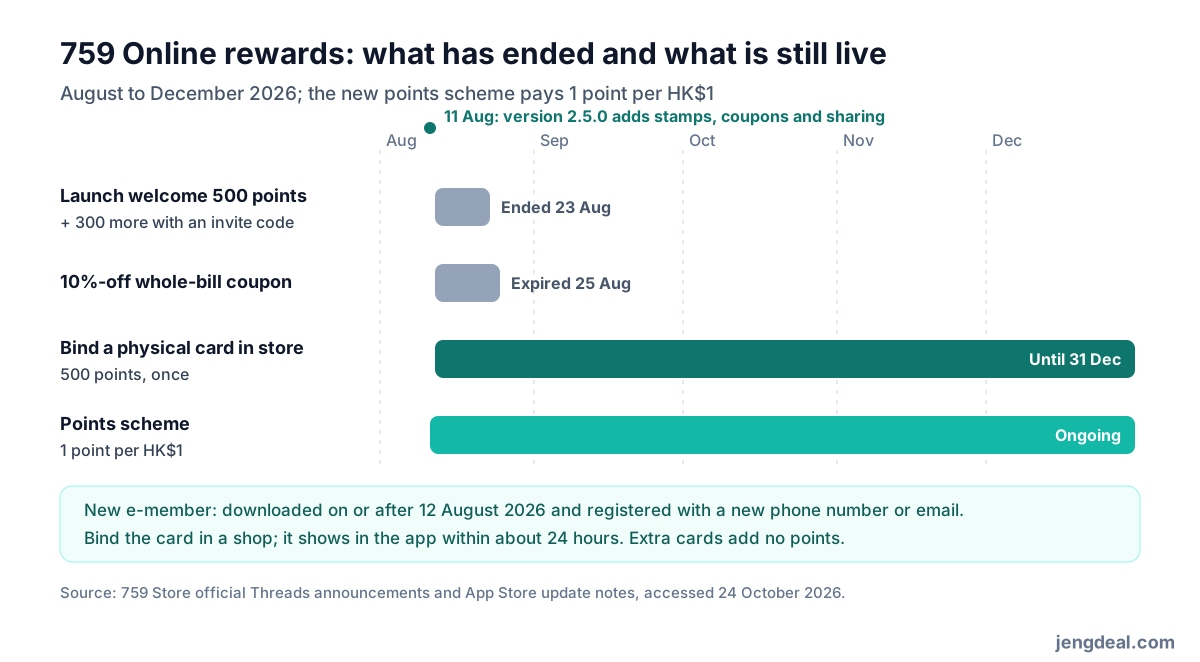
Its member app, 759 Online, comes from group company Coils Electronic Co., Limited and costs nothing. Version 2.5.0 landed on 11 August with stamps, coupons and sharing to go with the new points scheme. Show the e-member QR code in the app at the till to collect points and stamps, no physical card needed, and the app also shows what you bought each time, what it cost and what discount you got.
2. 1 point per HK$1, so what do points get you?
The new points scheme started in August 2026: spend HK$1 in store, get 1 point. You can swap points in the app for exclusive coupons and selected gifts, and the redemption page says how many points each one costs. What 759 doesn't say is what a point is worth, and points can't be cashed out.
Remember to show the e-member QR code at checkout, or a physical card that's bound to the app, or the points won't count. 759's terms say every offer only works when you tap, redeem or show the live screen in the app; screenshots, recordings, printouts and photos of the screen are all a no.
3. The 800 points from August are gone
When the app was upgraded, 759 ran a limited welcome until 23 August: 500 points for new users on first download and login, 300 more for entering a friend's invite code at sign-up, plus a 10%-off whole-bill coupon that stacked with other offers and was valid until 25 August. That promotion is over.
Right now 759 doesn't publish any welcome or invite code points; if there's a reward after you register, the app shows it. Old posts online saying "get 800 points" are out of date.
4. The real win right now: bind a physical card in store for 500 points
Per 759's official social account: if you're a new e-member, take your physical member card to a shop on or before 31 December 2026, get it linked to the app, and 500 points are yours. A new e-member means someone who downloaded 759 Online on or after 12 August and registered with a new phone number or a new email address; e-members who signed up before that miss out. It's once per person, and binding extra cards still only gets you 500 points.
How to bind: open the app in a shop, tap the small icon at the bottom centre, show the staff your e-member QR code, then show them the physical card you want to bind. The card shows up in the app within about 24 hours. It suits people with an old physical card at home who have never used that phone number or email for an e-membership; new members without a physical card can't use it.
5. How to enter CJXRFR34 so it actually sticks
Tap the link on this page and, if the app is already installed, 759 Online opens with invite code CJXRFR34 attached. If it isn't installed yet, the page only shows an "Install App" button that takes you to the App Store or Google Play, and the code won't carry over after installing, so type CJXRFR34 yourself when you register, or tap the link on this page again once the app is installed.
To be upfront: CJXRFR34 is our invite code. 759 doesn't publish anything for the member who shares a code, and the 300 points in August went to the new member who entered it.
6. Do the maths: how much do you need to spend each week?
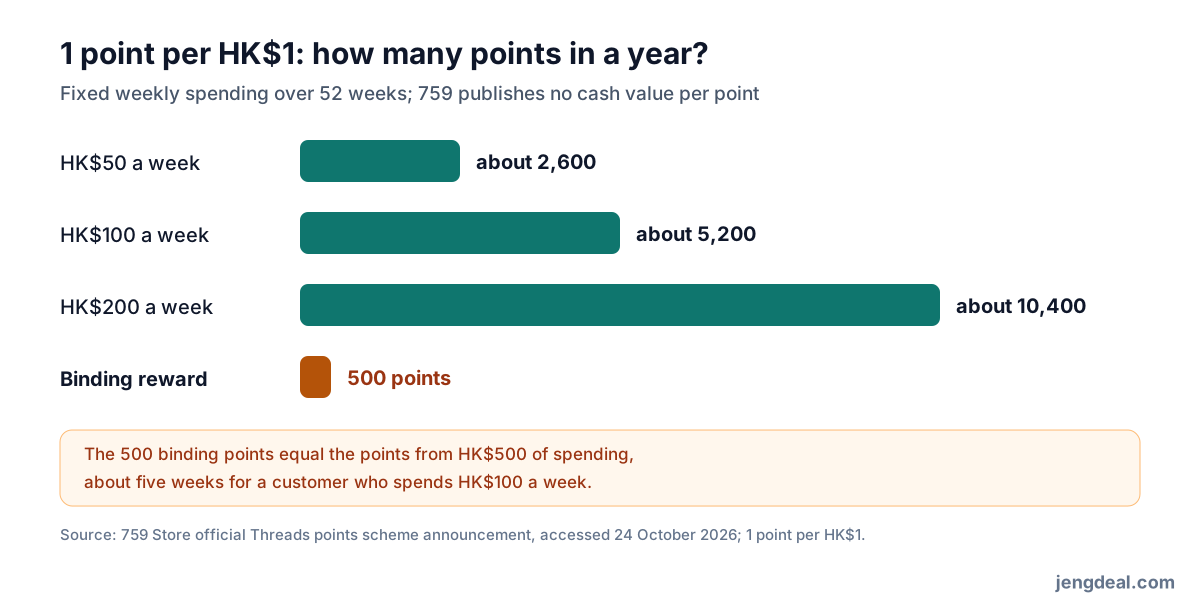
Spend HK$100 a week at 759 and you'll earn about 5,200 points a year; HK$50 a week gets about 2,600 points, and HK$200 a week about 10,400. The 500 binding points equal what you'd earn on HK$500 of shopping, so about five weeks' worth if you spend HK$100 a week.
Because 759 doesn't say what a point is worth, how good the points are comes down to how many each reward costs on the redemption page, and some users reckon the thresholds are on the high side. Bottom line: the big win from membership is the member-only promos, coupons and stamps; points are a bonus, so don't buy extra just to rack them up.
7. Coupons: no screenshots, and tie-in deals don't stack
Coupons and stamps all live in the app. Under 759's terms, coupons can't be combined with third-party tie-in member deals, like credit card, Octopus or other co-brand discounts. Thresholds and terms can change from promo to promo, so check each coupon's expiry date and what it covers before you use it.
Limited-time promos like double points say which products count, and you need to show a valid e-member QR code or bound physical card at checkout. 759 can change or end promotions at any time, and its decision is final if there's a dispute.
8. The app is a bit shaky, so have a plan B
As of 24 October 2026, 759 Online scored a lowly 2.0 from 459 ratings on the Hong Kong App Store and 3.1 from about 1,280 reviews on Google Play. Most reviews since the August update are complaints: a blank screen or the app closing by itself, the member QR code not loading and popping up "failed to retrieve server data", and being unable to register or log in, so no points at checkout. Some people also say the QR code won't show in dark mode.
The good reviews mostly like the clear purchase details and being able to skip paper receipts, though some shops still print one. Survival tips: bind your physical card as a backup; if the QR code won't show, switch off dark mode first; and open the member code while you're queuing, not when you reach the till.
9. Your phone needs to be new enough, and sign up with a fresh number
The app needs iOS 15.6 or Android 8.0 or later, and you can register with a phone number or email. The App Store privacy label is self-declared by the developer as "Data Not Collected" and isn't verified by Apple; the Google Play version has more than 500,000 downloads.
If you want the 500 binding points, register with a phone number or email that has never been used for a 759 e-membership; re-downloading the app with an old account doesn't make you a new e-member again.
10. Points aren't money, so don't shop just to earn them
Points can only be swapped for coupons and gifts in the 759 app; they're not cash and you can't use them anywhere else. The real savings come when snacks and household stuff you were going to buy anyway line up with member promos and coupons; buying two extra packs just to top up your points is a loss.
Who should go for it, and who shouldn't
Go for it: you hit 759 for snacks and household bits all the time and know how to use member coupons and promos; or you've got an old physical card but no e-membership and can get to a shop before 31 December to bind it for 500 points.
Skip it: you rarely go to 759, you want cash back, or you'd only be joining for the launch bonus that's already over; phones below iOS 15.6 or Android 8.0 can't run it either.
FAQ
- What's the invite code?
- CJXRFR34. Tapping the link on this page opens the app with the code; if you need to install the app first, type it in when you register.
- Are there welcome points if I join now?
- 759 doesn't publish any. The August 500 points and 300-point invite bonus ended on 23 August; check the app after you register to see if anything applies.
- Who gets the 500 binding points?
- E-members who downloaded the app on or after 12 August and registered with a new phone number or email get 500 points once if they bind a physical card in a shop on or before 31 December.
- Can I swap points for cash?
- No. Points only buy coupons and gifts in the app, and 759 doesn't say what a point is worth.
- Do I still need to carry a physical card?
- No, just show the e-member QR code in the app at checkout; a bound physical card works as a backup.
- Can I show a screenshot of a coupon?
- No. You need to tap it or show the live screen in the app; screenshots, recordings and printouts are all refused.
- The app won't open. How do I earn points?
- Switch off dark mode and open it again; if you've bound a physical card, just show the card instead.