
Stuck on HashKey or OSL BTC Whitelisting? Sign With Your Own Wallet in 5 Steps
By JengDeal editor· Last verified: 21 November 2026 (HKT)· About 8 min read
Skip paying Bitcoin miner fees for micro-deposits when withdrawing from HashKey or OSL. Follow this 5-step browser signing guide with our 21 Nov 2026 test scorecard and top 5 rejection traps.
Ad / referral links — we may earn a bonus when you sign up.
Investing involves risk. Prices can go down as well as up and may become worthless. This is not investment advice.
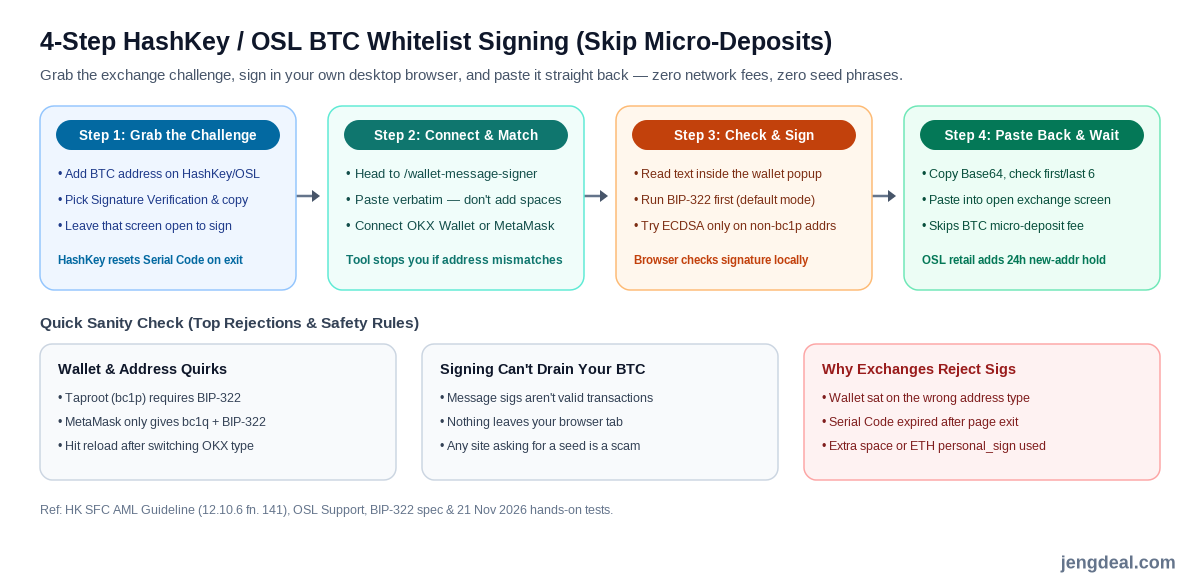
Skip the Miner Fee: 5 Steps to Sign Your BTC Address
- Copy the challenge text and leave that exchange tab alone: Add your self-custody BTC address on HashKey or OSL, choose Signature Verification, and copy the full string. Keep the page open — reopening HashKey issues a brand-new Serial Code and kills the old one.
- Paste verbatim into the signer page: Open Wallet Message Signer in another desktop browser tab, paste the exact challenge text without touching spaces or punctuation, and double-check the expected BTC address (for HashKey strings, the tool extracts the address for you).
- Connect OKX Wallet or MetaMask: Pick your desktop extension. The tool checks the wallet's active BTC address against the exchange target before signing and blocks you immediately on a mismatch so you don't waste a click.
- Eyeball the wallet popup, then approve: Hit sign with the default BIP-322 format and verify the text inside the extension popup matches the exchange string word for word. Only reach for the legacy ECDSA fallback if you are signing a 1…, 3… or bc1q… address and BIP-322 gets bounced.
- Wait for the local green check, copy, and paste back: Once the browser verifies the signature locally, hit copy for the Base64 output. Pasting into a phone app? Check the first 6 and last 6 characters, drop it into the open exchange screen, and submit.
21 November 2026 Hands-On Test Scorecard
| Venue | Wallet & Address Tested | Format Used | What Happened |
|---|---|---|---|
| HashKey | OKX Wallet (Taproot bc1p) | BIP-322 simple | Passed: HashKey accepted it on the spot — our confirmed working setup |
| HashKey | OKX Wallet (Taproot bc1p) | BIP-322 / ECDSA (earlier serial) | Bounced: cause never pinned down; most likely reopening the page had rotated the Serial Code |
| HashKey | OKX Wallet (Native SegWit bc1q) | ECDSA (byte-0 headers 31–34 & 39–42) | Bounced (expired serial): submitted with an old Serial Code; fresh-serial retest not yet run |
| OSL | MetaMask (Native SegWit bc1q) | BIP-322 simple | Unconfirmed: MetaMask produces a valid BIP-322 signature, but OSL backend acceptance is untested |
| OSL | OKX Wallet (Taproot bc1p) | ECDSA | Bounced (wrong address): wallet connected a different address than the one OSL asked for |
Tested 21 November 2026. Exchange verification backends change without warning, so always follow live on-screen rules.
Signature Bounced? Check These 5 Traps First
- Trap #1 — wallet parked on the wrong address type: One seed phrase spins out Taproot (bc1p), Native SegWit (bc1q), Nested SegWit (3…) and Legacy (1…), and extensions hand back whichever type is active right now. That tripped our own OSL test. After switching address types inside OKX Wallet, reload the signer tab so it picks up the new address.
- Trap #2 — HashKey Serial Code went stale: Closing or refreshing HashKey's verification modal spawns a fresh Serial Code. Even a mathematically valid signature fails if the serial underneath has rotated, so finish in one straight shot without leaving the page.
- Trap #3 — extra spaces or line breaks: The message has to match byte-for-byte. HashKey's tested string puts zero spaces after commas: It is hereby declared,on 2026/11/21,that I/we own the address <addr>.Serial Code:781240. Paste raw — don't tidy up the spacing.
- Trap #4 — using legacy ECDSA on Taproot: Taproot (bc1p) demands BIP-322 (bip322-simple), the exact format HashKey accepted. Legacy ECDSA (Electrum / Bitcoin Signed Message) is strictly a fallback for 1…, 3… or bc1q… and even splits header byte 0 across 31–34 (Electrum/P2PKH), 35–38 (P2SH-SegWit) and 39–42 (Native SegWit/Trezor). Start with BIP-322 every time.
- Trap #5 — calling Ethereum personal_sign: Ethereum's personal_sign signs with your 0x EVM key, not your Bitcoin key — it will never validate a BTC address.
Wallet & Address Cheat Sheet
| Extension / Setup | How It Connects & Signs | What to Watch Out For |
|---|---|---|
| OKX Wallet (desktop extension) | Uses window.okxwallet.bitcoin across bc1p, bc1q, 3… and 1…; signs both bip322-simple and ecdsa (docs note bip322-simple needs modern builds / app 6.51.0+) | Confirmed working on HashKey with bc1p + BIP-322; hit reload after switching address types in OKX |
| MetaMask (desktop extension) | Uses Wallet Standard (bitcoin:connect, bitcoin:signMessage) with no window global; official docs specify Native SegWit (bc1q) default and BIP-322 only | Signs and verifies locally, but OSL acceptance isn't confirmed yet; BTC imports currently require Native SegWit via 12/24-word SRP |
| Other Wallet Standard BTC extensions (Xverse, Phantom, etc.) | Picked up via the same Wallet Standard discovery hook as MetaMask | Untested by us — check the page's local verification status before pasting |
| Phone wallet apps and mobile browsers | Standard mobile browsers don't expose desktop extension APIs; in-app dapp browsers (like OKX app) remain untested | Sign on desktop, then verify the first 6 and last 6 characters if pasting into a phone app |
OSL's support page (updated 8 Oct 2026) explicitly notes that one-tap WalletConnect covers only select assets such as ETH and SOL — not Bitcoin — so OSL BTC verification must go through manual Micro Deposit or Signature Verification.
Why Exchanges Ask for This — and Why Signing Won't Drain Your BTC
This isn't red tape made up on a whim: Hong Kong's SFC AML Guideline (effective 1 June 2023) actively pushes licensed virtual asset platforms to whitelist personal wallets (paragraph 12.10.5) and verify ownership of unhosted wallets before transfers (paragraph 12.10.6), with footnote 141 spelling out micropayment tests and message signing tests as confirmation methods. Paragraphs 12.14.2 and 12.14.3 also mandate Travel Rule record-keeping for unhosted transfers (exempting certain originator ID fields below HK$8,000) and restricting transfers to wallets assessed as reliable. HashKey's help centre returned 403 when queried automatically, so our HashKey steps come from our 21 November 2026 live test (follow the live HashKey screen). On OSL, official support notes also flag a 24-hour protection period on newly verified withdrawal addresses for individual retail users.
On safety: signing a message simply stamps plain text with your private key to prove control of that address. It never creates a spendable transaction and never hits the Bitcoin mempool. Even BIP-322 — built so modern SegWit and Taproot addresses can sign messages — intentionally uses an invalid input inside its virtual transaction format so it can never spend coins on any real network.
4 Non-Negotiable Safety Rules Before You Click Sign
- Any site asking for a seed phrase or private key is an instant red flag: Close the tab immediately. Legitimate signing happens only inside your local wallet extension popup.
- Read the popup line by line: Even though plain BTC message signing can't spend funds, make sure the popup actually shows the exchange's ownership text (date, your address, serial code) and nothing dodgy.
- Keep everything inside your browser: Our Wallet Message Signer never sends your challenge text or signature to any server — signing stays in your extension and verification runs locally.
- Double-check Bitcoin mainnet before hitting withdraw: Once whitelisted, confirm both address and network because on-chain transfers can't be undone. If you're on an OSL retail account, budget for the 24-hour new-address protection period.
Still Weighing Up HashKey vs OSL?
Want to compare withdrawal fees, KYC transfer minimums and custody details before moving BTC? Check our HashKey Exchange review and OSL review, or jump straight to the HashKey referral page and OSL referral page for the latest sign-up terms.
Hong Kong Licensed Exchange Referral Offers

Provider
HashKey
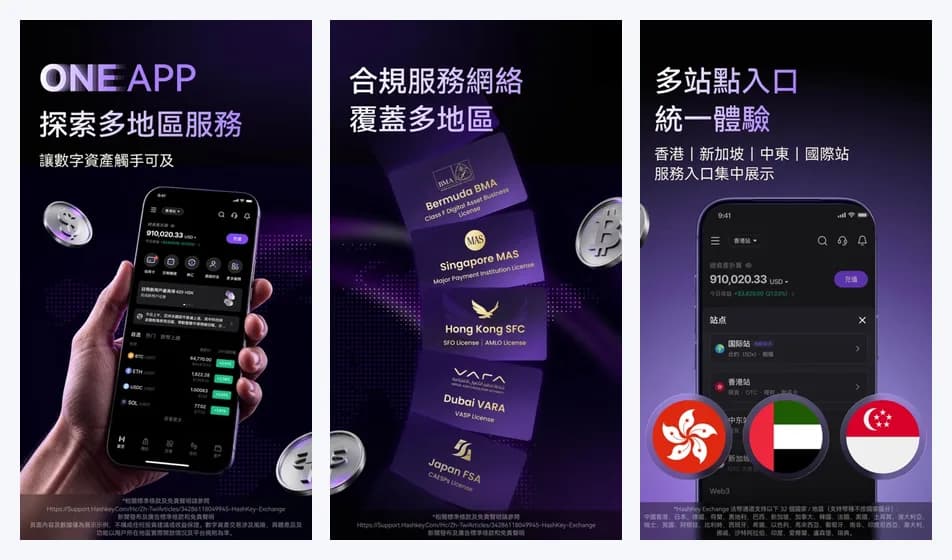
Want to play in crypto? Step one is picking a licensed exchange — don't wing it. Register for HashKey Exchange with invite code fgIxIl, and the Invite Friends screen spells it out: the invited friend gets HK$640 as a welcome bonus plus HK$200 in invite rewards, HK$840 total. KYC means a bank transfer of at least HK$10,000 (or USD equivalent) from your own account — or opening in person at HashKey's Hong Kong office — plus a risk assessment, and the account has to actually open — no scribbling a name and calling it done. Country eligibility follows the live terms. And the line we always have to say: crypto can fall to zero, so think before you ape in. Don't bet the farm.
Requirement: Complete KYC (a HK$10,000+ bank transfer from your own account or in-person opening, plus risk assessment) and open the account
Medium10-20 minutes plus full identity verificationPayout After qualifying KYC; rewards must be claimed manually in Reward Center / Referral
Verified 24 October 2026

Provider
OSL
Open an OSL account through this invite link; invite code yE48X is attached. OSL Exchange is run by OSL Digital Securities Limited, an SFC-licensed virtual asset trading platform (CE BPJ213) in HKEX-listed OSL Group (0863). Retail clients pay 0% as maker and 0.05% as taker on Pro Trade, and Hong Kong and US dollar deposits and withdrawals are free. Prices of virtual assets can be highly volatile; this is not investment advice.
Requirement: No deposit target for the invite; account verification needs a deposit of at least HK$10,000 from a bank account in your own name
Medium15-20 minutes to register and verify, plus the HK$10,000 verification depositPayout No sign-up reward to pay out: OSL's welcome and invite campaigns ended on 31 October 2026
Verified 22 November 2026
FAQ
- Could signing a BTC verification message let a site steal my coins?
- No. A Bitcoin message signature only proves ownership of plain text and cannot form a spendable on-chain transaction, and the tool runs locally without ever asking for a seed phrase. Just read the wallet popup carefully and never type a recovery phrase into any web page.
- Why can't I find a Sign Message button inside OKX Wallet or MetaMask?
- Neither desktop extension ships a manual Bitcoin message-signing screen in its popup UI. Both expose signing only via browser JavaScript APIs (window.okxwallet.bitcoin for OKX, Wallet Standard for MetaMask), which is why a local tool page has to trigger the wallet popup.
- HashKey rejected my signature — what's the fastest way to debug it?
- Run through three checks: confirm the connected wallet address type (bc1p vs bc1q) matches HashKey's screen, make sure you didn't close or reopen the HashKey modal (which rotates the Serial Code), and verify no spaces were added after commas and BIP-322 was used for Taproot.
- Can OSL verify my Bitcoin address automatically with WalletConnect?
- No. OSL's support page states that automatic WalletConnect verification applies only to specific assets such as ETH and SOL. For Bitcoin, you need manual verification via Micro Deposit or Signature Verification.
- I only have MetaMask — will it work on HashKey or OSL?
- MetaMask desktop exposes Native SegWit (bc1q) addresses and signs BIP-322 only. We haven't confirmed whether OSL or HashKey accepts MetaMask's bc1q BIP-322 signatures yet; if yours is rejected, fall back to the exchange's micro-deposit option or use OKX Wallet Taproot (bc1p) with BIP-322, which passed on HashKey.